7 Motherboard Picks for your next White PC build
Seven white AM5 motherboards from R3,199, with practical picks for compact builds, full-size PCs and anyone who needs more storage or connectivity.

Let's set the stage: you're building up savings for your dream machine. It's going to be white - impressive to look at, but notoriously difficult to match up. You're sure it can be done, but you're stuck on the most important bit: the motherboard. While most DIY builders tend to start with the case and work inward, the motherboard sets the tone for everything else in the build.
The final effect is what you're after, and you don't want the wrong thing catching the eye for the wrong reasons. After today, you should be armed with options for your showcase white PC build, starting with seven excellent picks for a motherboard.
There are compact micro-ATX options, full-size ATX boards and a couple of more distinctive choices at the top, all on AMD's Socket AM5 platform. But form need not rule out function - careful attention was paid to the board layouts, slot types and placement, and connectivity.
Let's get to it, then.
The shortlist
| Motherboard | Size | Sale price | Why it's here |
|---|---|---|---|
| Sapphire PURE B850M WIFI | Micro-ATX | R3,199 | The lowest-priced starting point in this selection |
| Sapphire PURE B850A WIFI 7 | ATX | R3,999 | Full-size layout, WiFi 7 and three M.2 slots |
| ASUS TUF GAMING B850M-PLUS WIFI7 W | Micro-ATX | R4,199 | WiFi 7 and three M.2 slots in a smaller board |
| Gigabyte B850M AORUS ELITE WIFI6E ICE | Micro-ATX | R3,999 | Compact ICE styling with WiFi 6E |
| Gigabyte B850 AORUS ELITE WIFI7 ICE | ATX | R4,799 | Full-size ICE styling, WiFi 7 and three M.2 slots |
| Gigabyte B850 AORUS ELITE-P ICE ARI Edition | ATX | R5,999 | ARI-themed design, four M.2 slots and 5GbE networking |
| Gigabyte X870 AORUS ELITE X3D ICE WIFI7 | ATX | R6,299 | Two rear USB4 Type-C ports and four M.2 slots |
1. Sapphire PURE B850M WIFI: start with the essentials
Shop the Sapphire PURE B850M WIFI
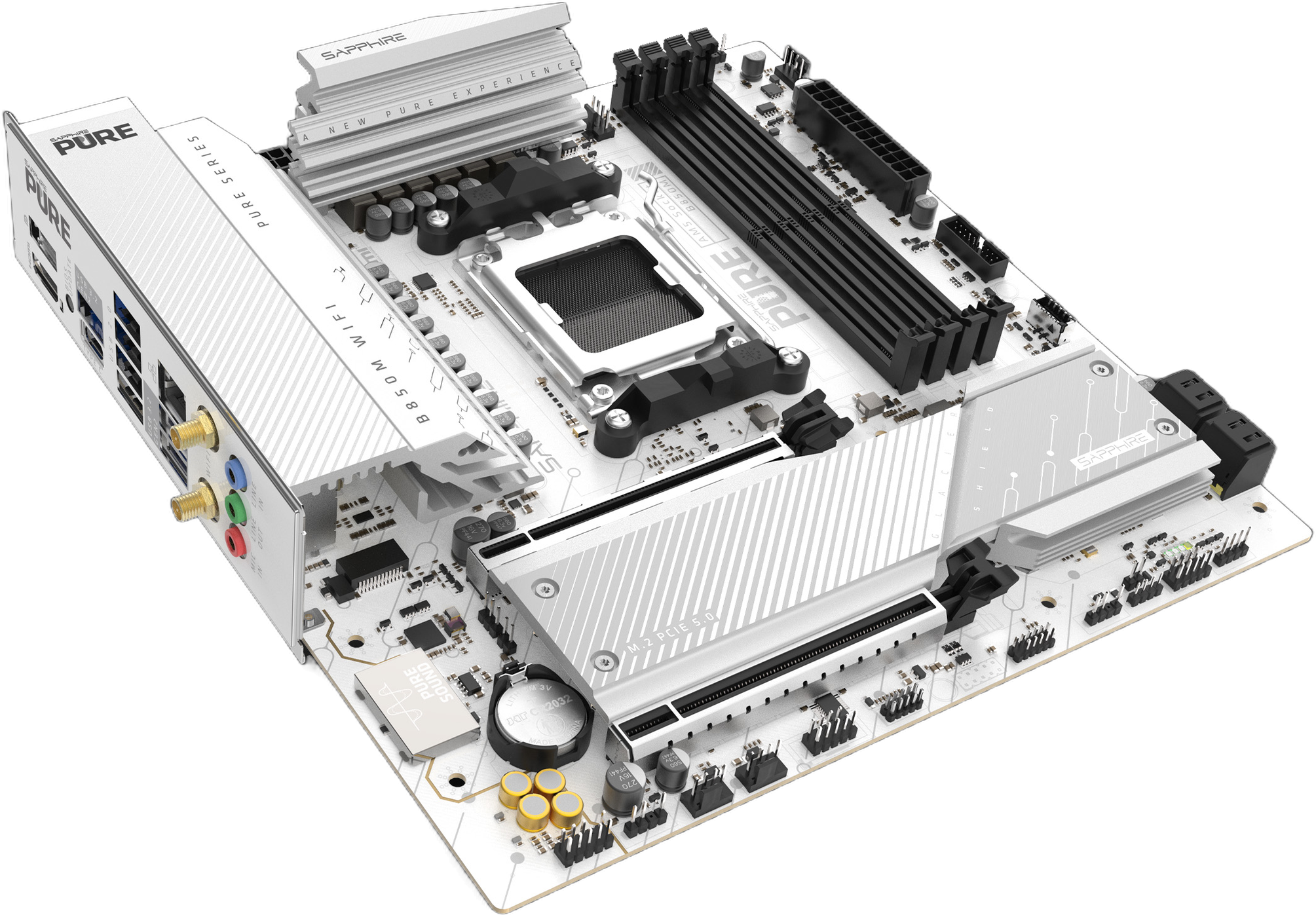
For just, R3,199 the PURE B850M WIFI is the most affordable motherboard in this group (and just as capable outside it). Sapphire's attention to detail on a budget board is surprising. There are some black elements that remain like the connectors and the DIMM slots, but these should be less noticeable once the build comes together.
The PURE B850M WIFI is a micro-ATX B850 board with four DDR5 memory slots, WiFi 6 and 2.5GbE wired networking. You get two M.2 storage slots, one supporting PCIe 5.0 and the other PCIe 4.0, so there's room to add a second NVMe drive later without starting over.
The smaller board suits a compact build, provided the case supports micro-ATX. It will also fit in many ATX cases, and you'd be able to take better advantage of the PCIe 4.0 x4 slot at the bottom of the board. Plug in anything you fancy in there, as long as there's clearance for it.
Sapphire's choice to rotate the SATA ports allows you to use extra-long GPUs without hassle, though any cards with a lot of metal on top may result in the USB-C port being a tight fit. Be sure to plug that in before the GPU.
For a more budget-friendly white-themed gaming PC, this is a sensible place to start.
2. Three boards around R4,000
These next three boards sit close enough in price to compare directly, but they aren't exactly alike. Two are micro-ATX, one is ATX, and their individual design is very opinionated.
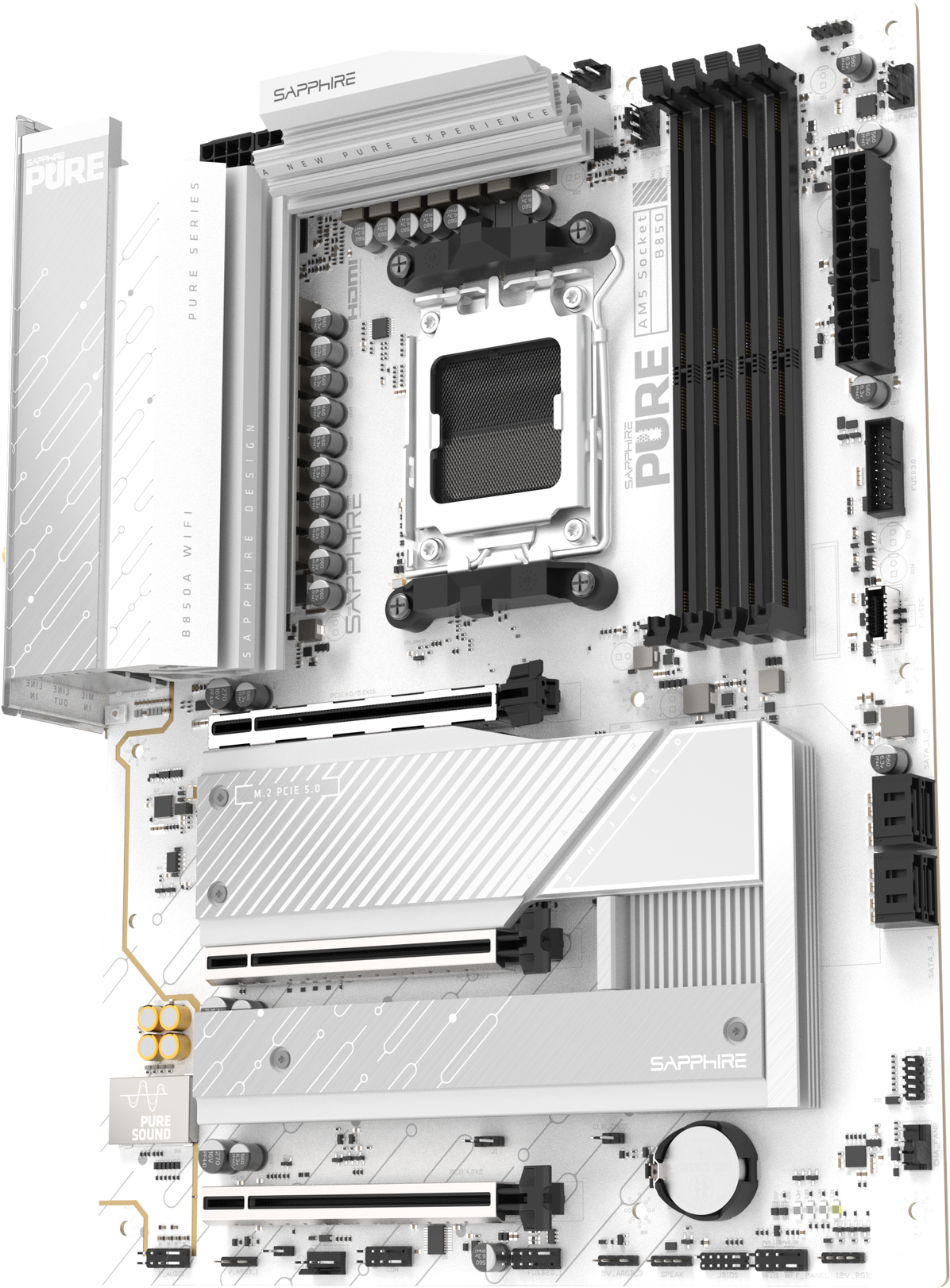
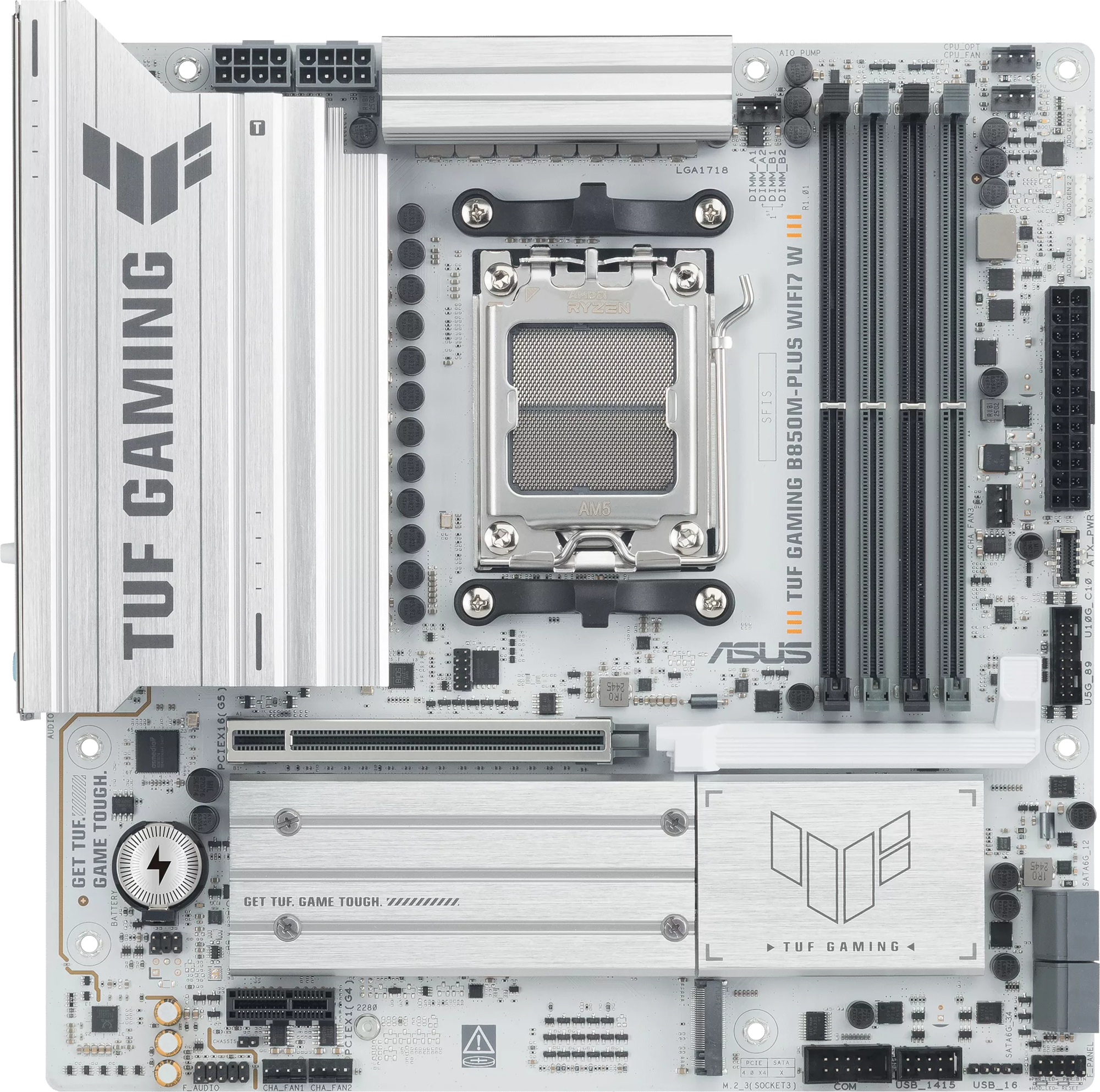
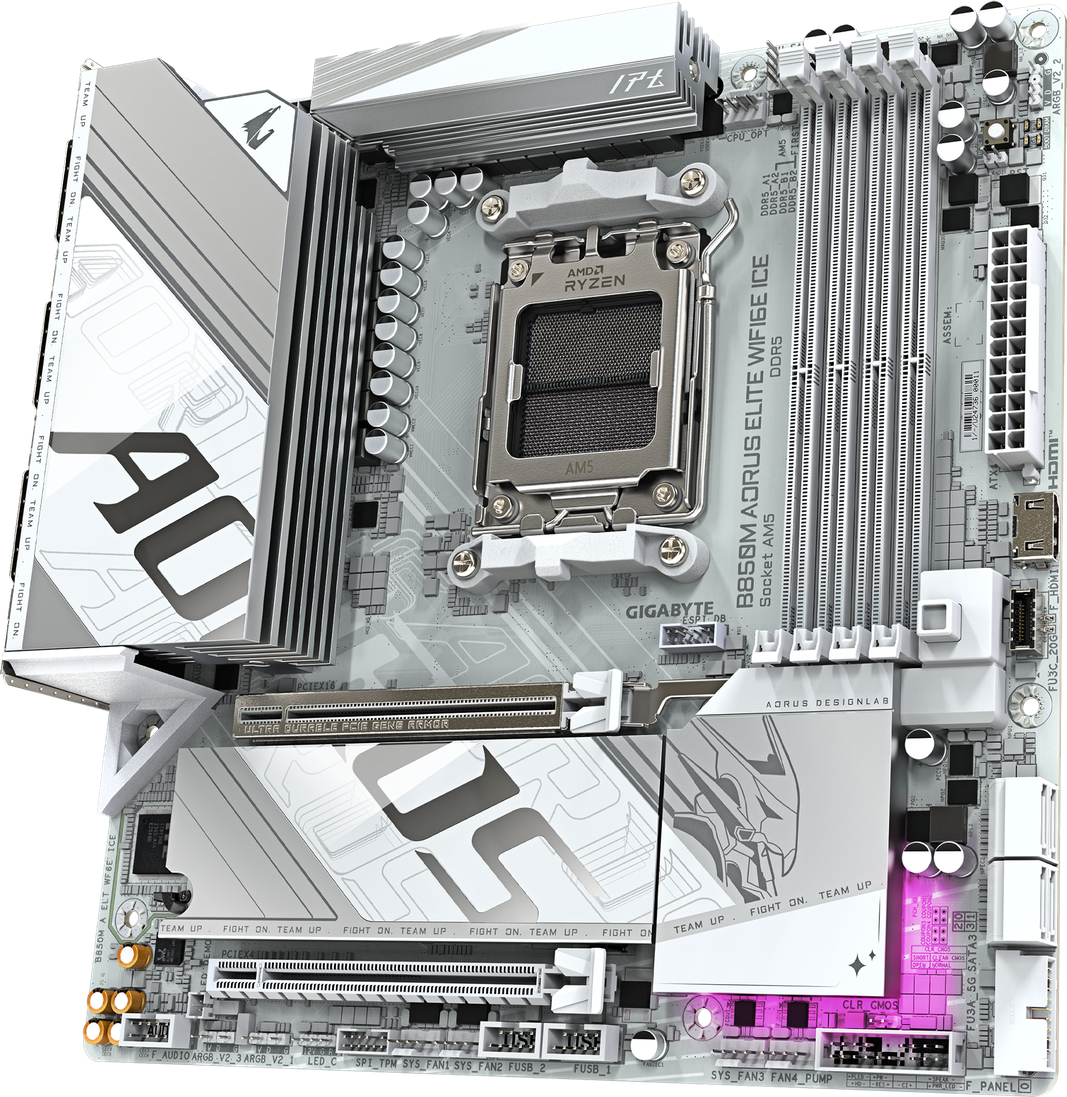
Sapphire PURE B850A WIFI 7: a full-size alternative
Shop the Sapphire PURE B850A WIFI 7
First up is Sapphire's PURE B850A WIFI 7 at R3,999. Compared with the smaller PURE B850M WIFI, the extra R800 affords you an ATX layout, WiFi 7 with 2.5GbE networking, and a third M.2 slot. This is a heavily contested segment in the motherboard market, with Sapphire having to battle against Gigabyte and ASUS for attention. The layout is the key differentiator here.
Sapphire expects that buyers will be using the PCIe slot layout to their advantage, so the second slot is electrically PCIe 4.0 x4 in a full-size slot, while the bottom-most slot is PCIe 4.0 x2.
These lend themselves nicely towards running a second GPU for video editing or AI inference, while the final slot is useful for extra Ethernet ports or other high-speed peripherals.
Choose the PURE B850A WIFI 7 if you already have an ATX case in mind, and can see yourself using the extra expansion room. Choose the smaller PURE B850M WIFI if it already covers what you need.
ASUS TUF GAMING B850M-PLUS WIFI7 W
Shop the ASUS TUF GAMING B850M-PLUS WIFI7 W
The TUF GAMING B850M-PLUS WIFI7 W TUF is R4,199, a slight increase in price compared to its competitors. ASUS kits it out with WiFi 7, 2.5GbE Ethernet and three M.2 slots in a micro-ATX layout, including one PCIe 5.0 M.2 slot. See what I mean by heavily contested? ASUS is trying to tick all the boxes here.
ASUS even ships a nifty PCIe latch mechanism for the GPU, allowing you to unlock it without struggling when the board is already inside a case. Careful with the USB 3.0 header to the right, though, you don't want to bend that.
The TUF sits on useful middle ground if you want a smaller case without dropping to two M.2 slots. It is also only R200 more than the competing Gigabyte board below at the current prices. Your considerations might then shift to the ecosystem - if you intend on buying ASUS peripherals, then chances are you're going to be running Armoury Crate and Aura Sync anyway. It's a natural fit.
Gigabyte B850M AORUS ELITE WIFI6E ICE
Shop the Gigabyte B850M AORUS ELITE WIFI6E ICE
At a competitive R3,999, Gigabyte's board brings the ICE look to a micro-ATX build. It has WiFi 6E, 2.5GbE Ethernet and two M.2 slots, one PCIe 5.0 and one PCIe 4.0. There is only a single 8-Pin EPS connector, suggesting that Gigabyte isn't aiming this board at power users or overclockers.
The ICE family is off-white, and leans much more into the grey part of the colour spectrum. Gigabyte tries to make the board more prominent, choosing to offer more contrast with their designs with complimentary shades for their chassis, power supplies, GPUs and water coolers.
Nevertheless, it's a good pick. Gigabyte rotates ports around the GPU area to keep things tidy, and includes a PCIe button latch instead of a lever like ASUS. WiFi 6E support is also still more than enough for most uses, especially given how expensive WiFi 7 routers and access points still are.
How do you pick 'em? We'd recommend the Sapphire if you need the space, the Gigabyte if you're looking for a set-and-forget setup, and we'd also recommend the ASUS if you're keen on both WiFi 7 and picking up ASUS periperals down the line to integrate neatly into Armoury Crate and Aura Sync.
3. Gigabyte B850 AORUS ELITE WIFI7 ICE
Shop the Gigabyte B850 AORUS ELITE WIFI7 ICE
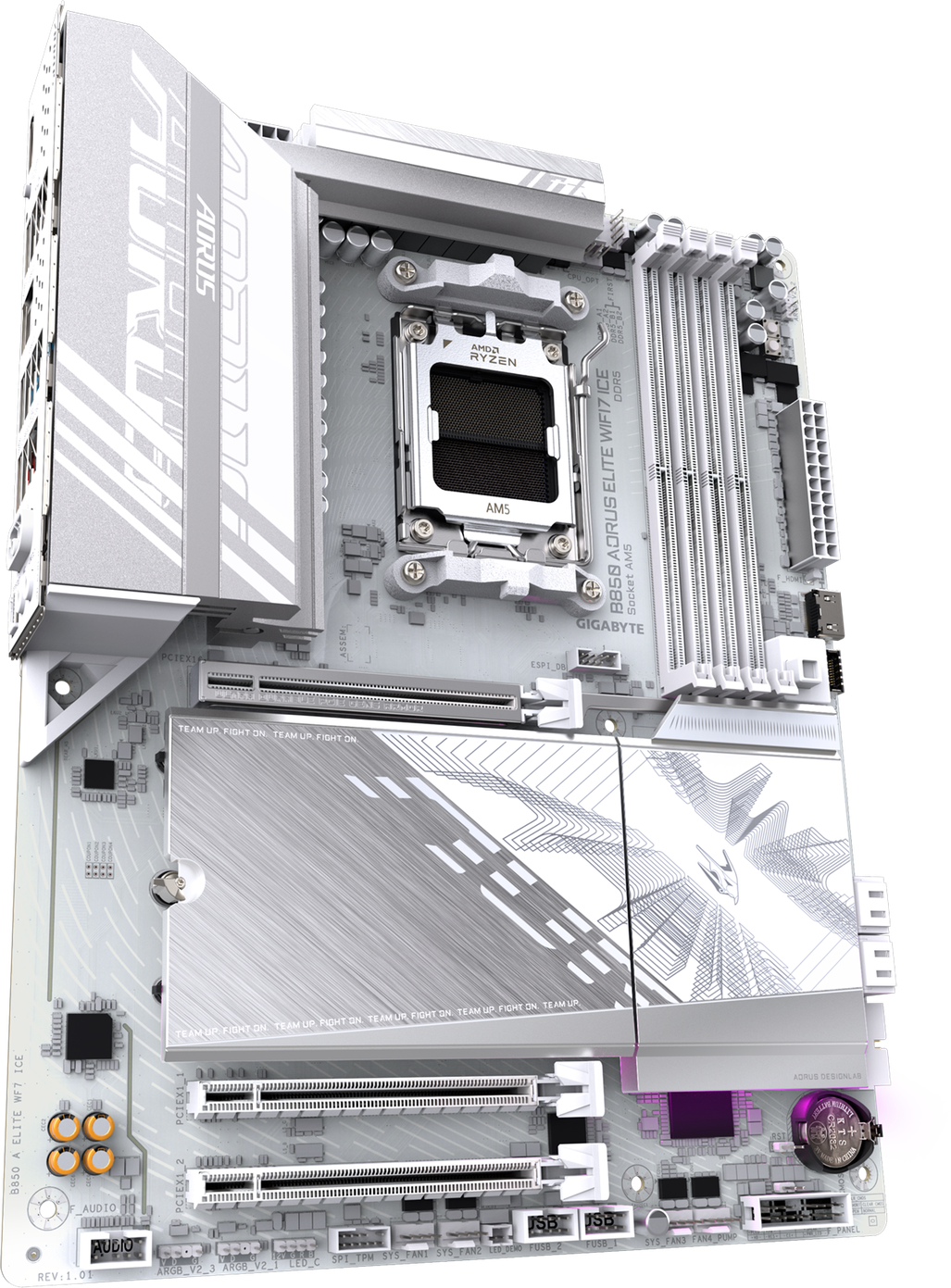
At R4,799, the B850 AORUS ELITE WIFI7 ICE is a bit of a step up in price from the three boards above. It combines WiFi 7, 2.5GbE Ethernet and three M.2 slots with Gigabyte's ICE design, and retains the PCIe button release mechanism.
If you're building into an ATX tower and want the board to occupy that space fully, this is a great pick. There isn't much to differentiate this from the smaller B850M AORUS ELITE WIFI6E ICE sibling, although there is an extra 4-pin EPS 12V connector for more power-hungry CPUs.
Compared to the Sapphire PURE B850A WIFI 7, the slot layout isn't quite ideal for multiple GPUs or other high-bandwith peripherals, but you are not restructed in any way by how large of a GPU you can fit on this board.
The first two NVMe slots are also directly connected to the CPU, so you enjoy lower latency for higher-bandwidth SSDs if that's something you need.
4. Gigabyte B850 AORUS ELITE-P ICE ARI Edition: white with UwU
Shop the Gigabyte B850 AORUS ELITE-P ICE ARI Edition
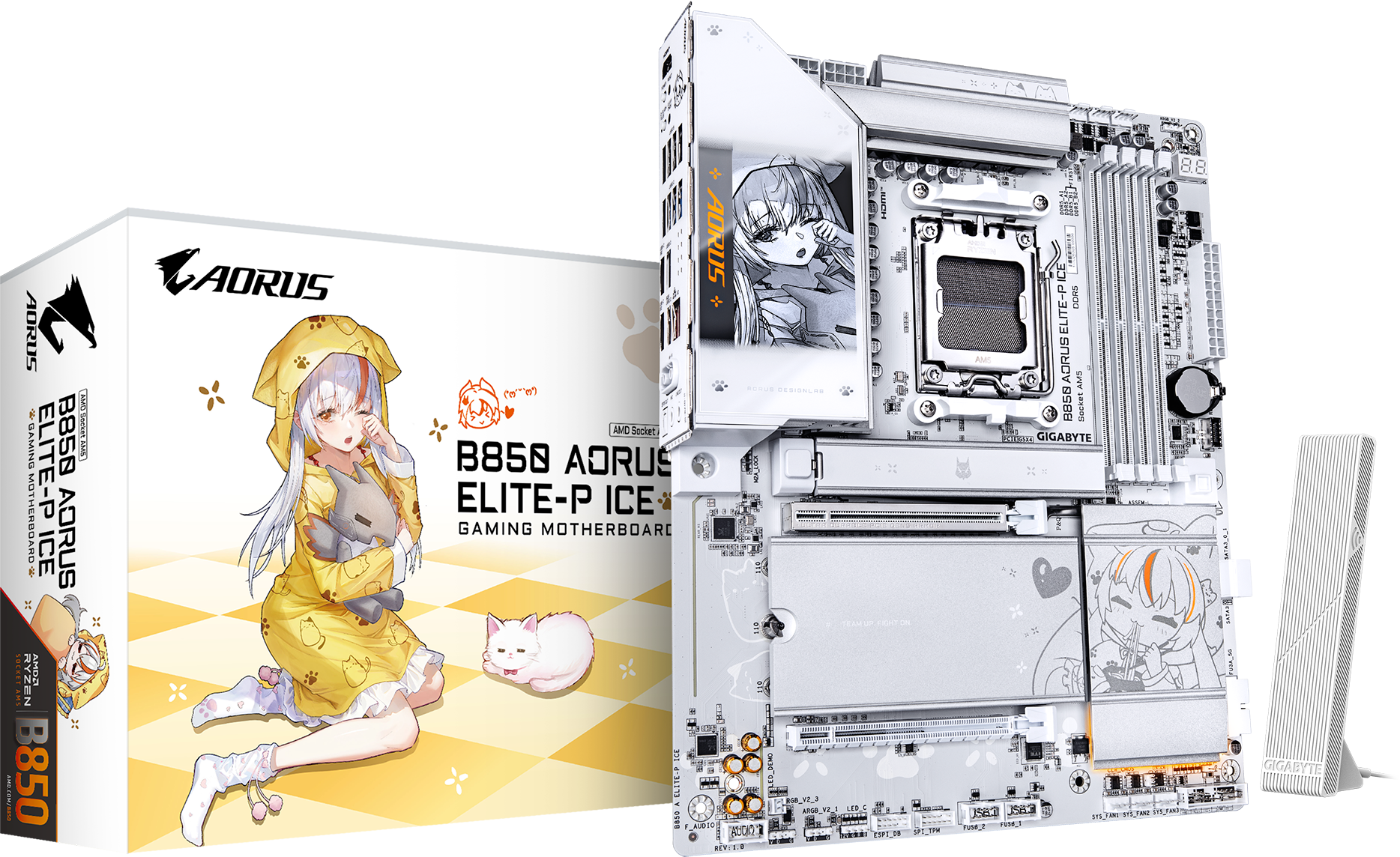
The B850 AORUS ELITE-P ICE ARI Edition is R5,999. This board is the more... expressive option in the list, with Gigabyte's ARI-themed design and LCD Edge View rather than an entirely neutral finish.
The weirdness of the ARI character aside (look, we used to have scantily clad cyborgs on boxes before, this is fine), Gigabyte has put some serious chops behind this board. We have four M.2 slots, including one PCIe 5.0 slot, plus WiFi 7 and 5GbE Ethernet.
The faster wired connection is relevant if you have compatible network gear and regularly move large files to local NAS storage. If you happen to have a 5GbE internet connection, perhaps we could live with you for a while and download Steam games at a chill 625 megabytes per second? That's a whole Call of Duty Modern Warfare 4 in under four minutes!
There's also a debug LED on the board, which is incredibly rare on budget options these days, and a very neat layout for the fan headers. Those are located on the top and bottom of the board, matching more closely how chassis route cables for fans these days. The primary Gen 5 SSD slot gets its own heatsink, and the second PCIe slot is PCIe 4.0 x4.
This is a showcase board you choose because you want its character design visible in the finished build, as well as its very strong storage and networking options.
5. Gigabyte X870 AORUS ELITE X3D ICE WIFI7: spend on connections you'll use
Shop the Gigabyte X870 AORUS ELITE X3D ICE WIFI7
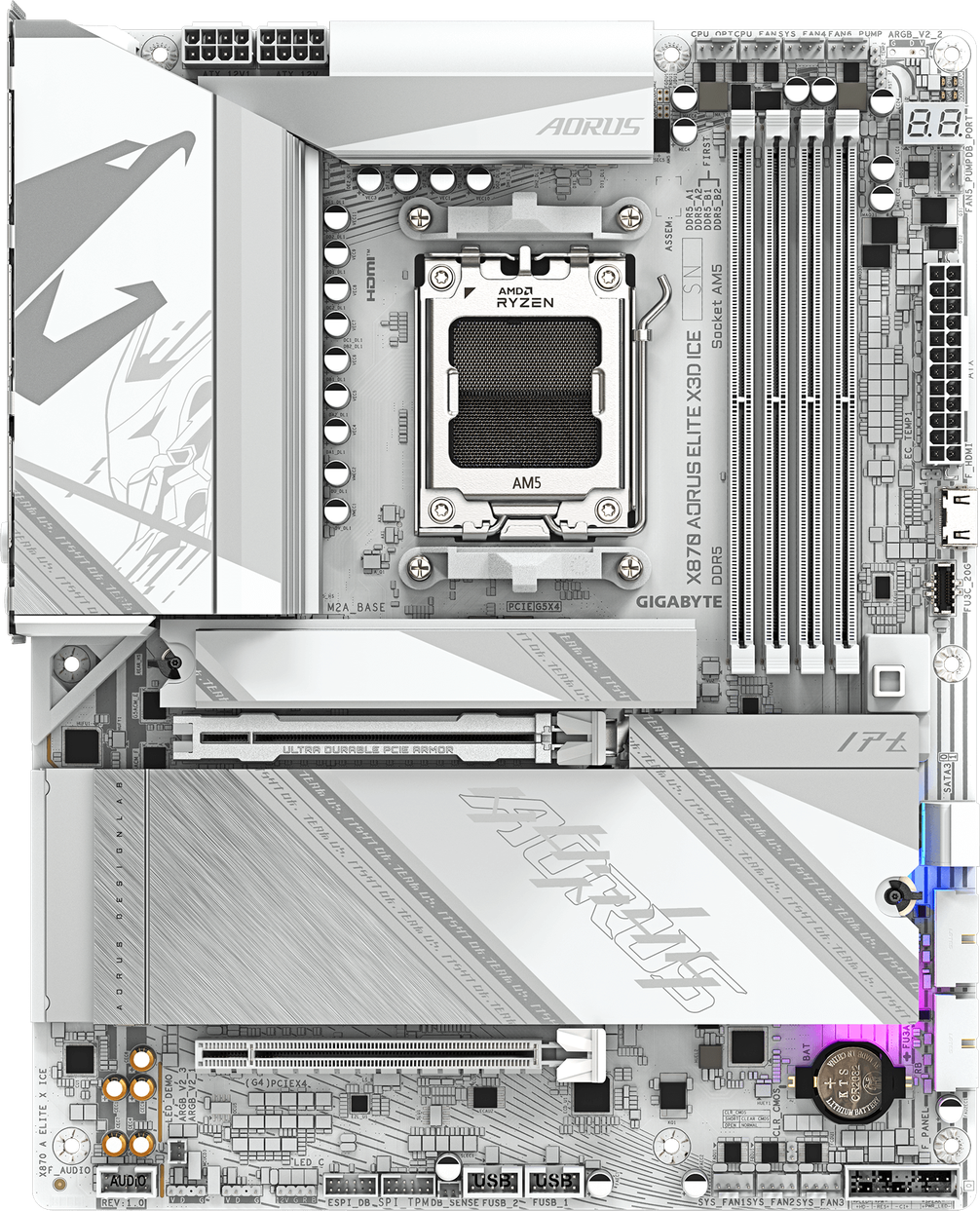
At R6,299 the X870 AORUS ELITE X3D ICE WIFI7 tops this shortlist with its price and the standard equipment. Its practical attractions include two rear USB4 10Gbps Type-C ports, WiFi 7 and four M.2 slots, as well as a modern port layout with a PCIe button release switch.
USB4 is worth looking for if you use compatible high-speed external storage or a dock with capabilities you actually need. The four M.2 slots also give you more flexibility for evolving storage needs, although the board setup now introduces lane-sharing considerations. Some slots share bandwidth and connectivity to the CPU or to the main chipset, and latency on some ports may be something to take into account. The Socket AM5 platform is fantastic and flexible, but if you're looking to fill every slot it might be time to consider Threadripper instead.
A note on naming as well: the X3D branding is not a requirement to fit an X3D processor to this board. This is instead indicating support for AMD's X3D Turbo Mode, which is a set of optimisations to enhance gaming performance on non-X3D CPUs from AMD's Ryzen family. Hardware Unboxed tested this feature against Intel's Core Ultra 9 285K with Intel's competing feature, the 200S Boost setting.
Matching the rest of a white build
White is harder to match than it looks in a product photo. Painted steel, plastic, braided cables and coated heatsinks can have different undertones, and room lighting changes how they appear. A silver heatsink beside a white case doesn't have to be a mistake.
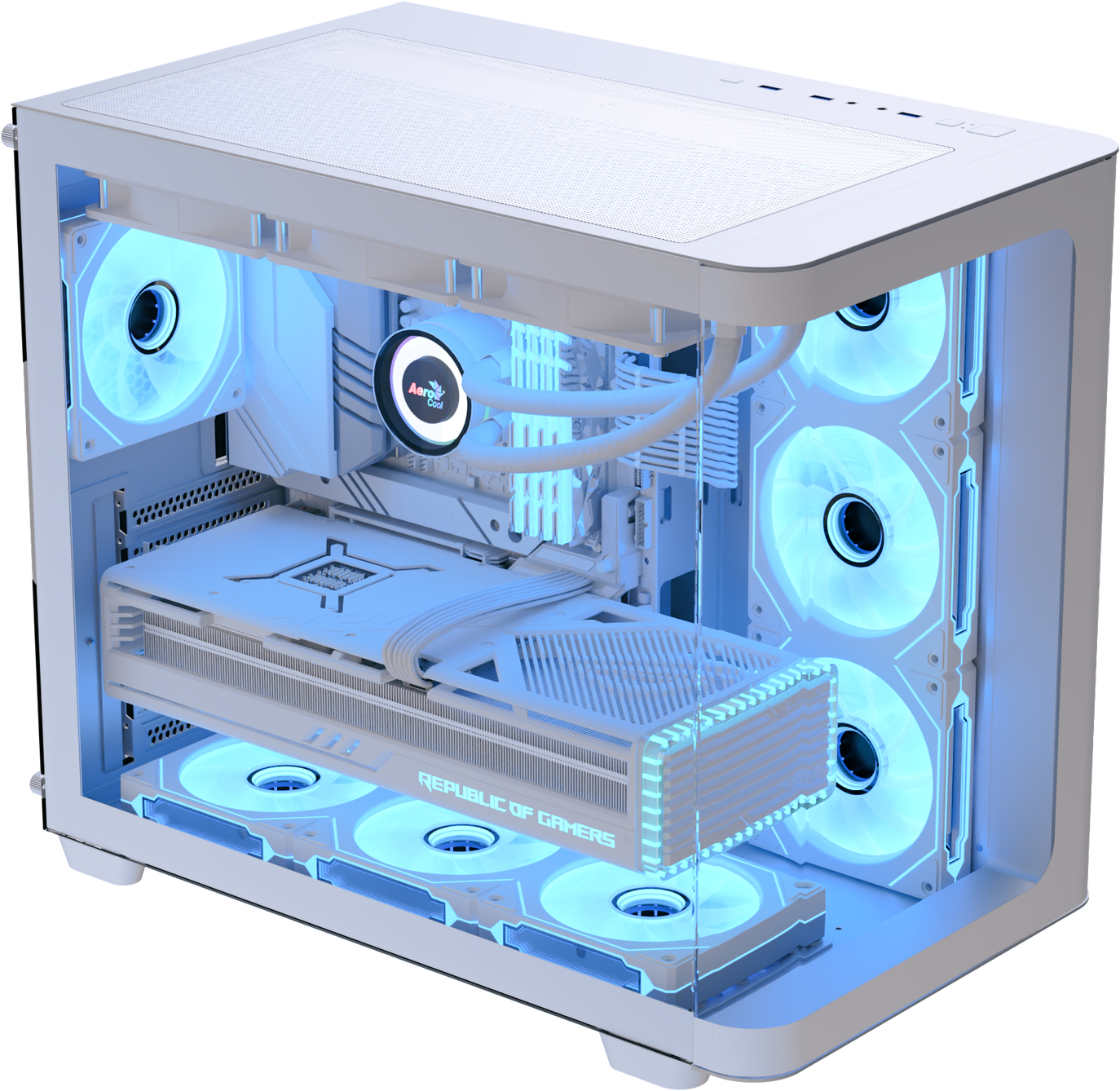
You have three useful directions: keep the major components white and accept small differences in finish, or use black and white deliberately, or pair white hardware with another light colour. Pale blue, lilac and soft pink can all give the build a lovely, clear theme without requiring every component to be the same shade.
Start your planning with the largest visible pieces: the case, motherboard, graphics card and cooler. Then decide whether your memory, cables and fans should blend in or provide contrast. Tasteful RGB lighting can tie those choices together.
Choose the Motherboard That Fits Your Build
Not sure which board suits your case, or how to match it with the rest of your white build? Start with your components in our PC Builder, then share your planned parts list and budget with our team.
We can help you check compatibility and find a board with the connections and expansion slots you need, and find colour-matching parts!
Don't see your ideal motherboard here? Visit wootware.co.za to browse the full range, set a price alert, or contact us for a quote.