Which GMKtec Mini PC Should You Buy?
Choose a GMKtec mini PC for office work, creative projects, local AI or gaming. Use our interactive finder to compare configurations, prices and practical trade-offs.
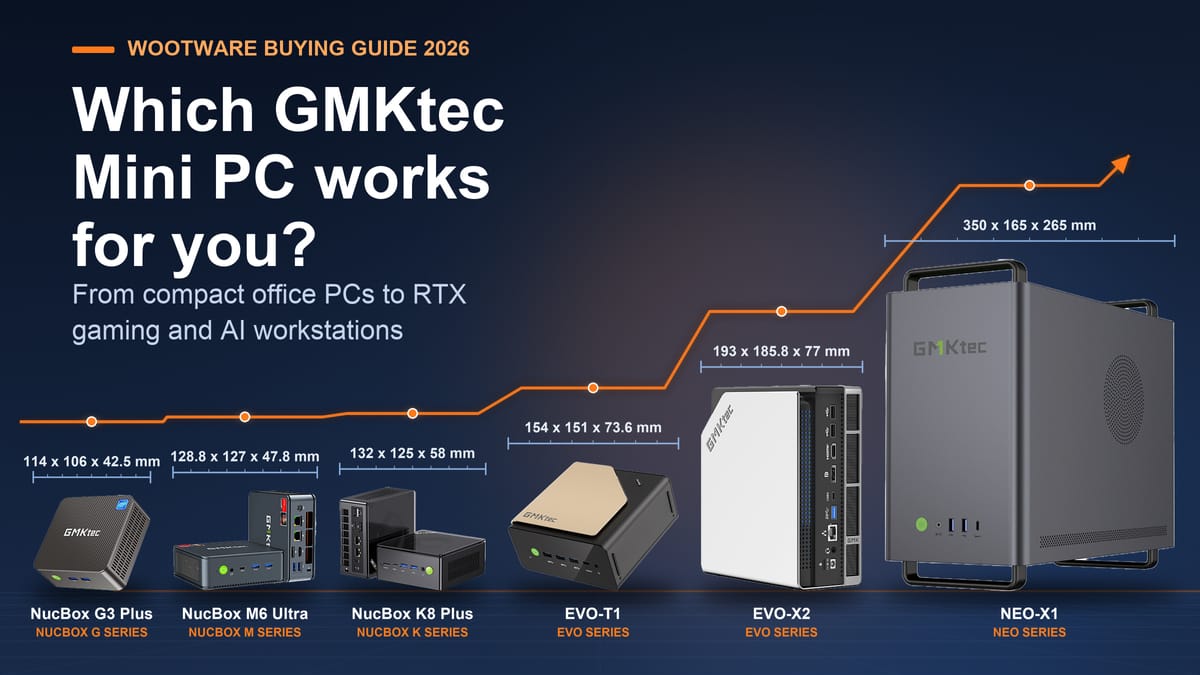
GMKtec’s NUCBOX range runs from a R4,299 desk box to compact workstations with a discrete RTX 5070 or 128GB of shared AI memory. With names spanning the G, M3, M6, K, EVO and NEO series, and sibling configurations that differ only in memory and storage, it helps to have a clear map. This guide covers all 29 configurations Wootware carries, and answers one question: which one matches what you actually want to do?
Start with the picker below, then find the full comparison table and use-case breakdowns underneath. Every pick links to the exact product page, and prices were checked on 1 October 2026.
Quick picks
- Everyday office on a tight budget: NUCBOX G3S (R5,799). An efficient Intel N95 quad-core chip, Windows 11 Pro and an upgradeable memory slot.
- Best all-round productivity: NUCBOX M3 Pro 16GB/512GB (R11,499). Twelve i5-13500H cores and a PCIe 4.0 SSD at an entry-level desktop price.
- Most versatile all-rounder: NUCBOX M6 Ultra 32GB/1TB (R15,499). DDR5, USB4, dual 2.5GbE LAN and memory that upgrades to 128GB.
- Cheapest local-AI machine: NUCBOX K17 Plus (R19,999). Copilot+ class with GMKtec quoting up to 115 TOPS of platform AI performance.
- Unified-memory AI workstation: NUCBOX EVO-X2 64GB (R37,999). Ryzen AI Max+ 395 with a shared CPU/GPU memory pool.
- RTX gaming and CUDA work: NEO-X1 (R39,999). Ryzen 9 9955HX with a discrete RTX 5060 Ti.
Which GMKtec should I buy?
Answer two quick questions, add optional requirements if you like, and we'll suggest a model — and a screen to pair with it.
Suggestions are drawn from the specifications in this guide, with Wootware prices checked on 1 October 2026. Prices change, so the linked product pages always show the current price. A few configurations share a family photo. Screen suggestions in “Pair it with” are matched to the recommended PC’s outputs and budget band.
The range at a glance
Every configuration in this guide, grouped by family, with each configuration's price and standard warranty shown beside its name. The link under each 1-year chip opens that configuration’s 1-year-to-3-year warranty upgrade at Wootware. Storage and memory figures are the as-shipped configuration; several models add a free SO-DIMM or M.2 slot you can fill later.
| Model | Price | Warranty | Key specs | ||||
|---|---|---|---|---|---|---|---|
| Entry-level N boxes | |||||||
| NUCBOX G5S | R4,299 | 1-year | Intel N5095 · 4C/4T · 2.9GHz | Intel UHD | 8GB on-board (no slots) | 128GB M.2 SATA | Upgrade to 3 Years |
| NUCBOX G5S | R4,799 | 1-year | Intel N5095 · 4C/4T · 2.9GHz | Intel UHD | 8GB on-board (no slots) | 256GB M.2 SATA | Upgrade to 3 Years |
| NUCBOX G3S | R5,799 | 1-year | Intel N95 · 4C/4T · 3.4GHz | Intel UHD | 8GB DDR4 (1× SO-DIMM, to 32GB) | 256GB M.2 | Upgrade to 3 Years |
| NUCBOX G3 Plus | R6,499 | 1-year | Intel N150 · 4C/4T · 3.6GHz | Intel UHD | 8GB DDR4-3200 (1× SO-DIMM, to 16GB) | 256GB NVMe | Upgrade to 3 Years |
| NUCBOX G11 | R6,799 | 1-year | Ryzen Embedded R2514 · 4C/8T · 3.7GHz | Radeon Vega 8 | 16GB DDR4-2666 (2× SO-DIMM) | 256GB NVMe | Upgrade to 3 Years |
| NUCBOX G11 | R7,499 | 1-year | Ryzen Embedded R2514 · 4C/8T · 3.7GHz | Radeon Vega 8 | 16GB DDR4-2666 (2× SO-DIMM) | 512GB NVMe | Upgrade to 3 Years |
| NUCBOX G3 Plus | R7,999 | 1-year | Intel N150 · 4C/4T · 3.6GHz | Intel UHD | 16GB DDR4-3200 (1× SO-DIMM, to 16GB) | 512GB NVMe | Upgrade to 3 Years |
| Productivity: M3 and M6 | |||||||
| NUCBOX G10 | R7,999 | 1-year | Ryzen 5 3500U · 4C/8T · 3.7GHz | Radeon Vega 8 | 16GB DDR4-2400 (2× SO-DIMM, to 64GB) | 512GB NVMe | Upgrade to 3 Years |
| NUCBOX G10 | R8,999 | 1-year | Ryzen 5 3500U · 4C/8T · 3.7GHz | Radeon Vega 8 | 16GB DDR4-2400 (2× SO-DIMM, to 64GB) | 1TB NVMe | Upgrade to 3 Years |
| NUCBOX M3 Pro | R11,499 | 1-year | Core i5-13500H · 12C/16T · 4.7GHz | Iris Xe | 16GB DDR4-3200 (2× SO-DIMM, to 32GB) | 512GB PCIe 4.0 NVMe | Upgrade to 3 Years |
| NUCBOX M3 Ultra | R12,499 | 1-year | Core i7-12700H · 14C/20T · 4.7GHz | Iris Xe | 32GB DDR4-3200 (2× SO-DIMM) | 1TB PCIe 3.0 NVMe | Upgrade to 3 Years |
| NUCBOX M6 Ultra | R12,999 | 1-year | Ryzen 5 7640HS · 6C/12T · 5.0GHz | Radeon 760M | 16GB DDR5-4800 (2× SO-DIMM, to 128GB) | 512GB NVMe | Upgrade to 3 Years |
| NUCBOX M3 | R13,699 | 1-year | Core i5-12450H · 8C/12T · 4.4GHz | Intel UHD | 32GB DDR4-3200 (2× SO-DIMM) | 1TB PCIe 3.0 NVMe | Upgrade to 3 Years |
| NUCBOX M3 Plus | R13,999 | 1-year | Core i9-12900HK · 14C/20T · 5.0GHz | Iris Xe | 32GB DDR4-3200 (2× SO-DIMM) | 1TB PCIe 3.0 NVMe | Upgrade to 3 Years |
| NUCBOX M3 Pro | R14,499 | 1-year | Core i5-13500H · 12C/16T · 4.7GHz | Iris Xe | 32GB DDR4-3200 (2× SO-DIMM) | 1TB PCIe 4.0 NVMe | Upgrade to 3 Years |
| NUCBOX M6 Ultra | R15,499 | 1-year | Ryzen 5 7640HS · 6C/12T · 5.0GHz | Radeon 760M | 32GB DDR5-4800 (2× SO-DIMM, to 128GB) | 1TB NVMe | Upgrade to 3 Years |
| All-round and iGPU gaming: K series | |||||||
| NUCBOX K8 Plus | R17,499 | 1-year | Ryzen 7 8845HS · 8C/16T · 5.1GHz | Radeon 780M | 32GB DDR5-5600 (2× SO-DIMM) | 1TB NVMe | Upgrade to 3 Years |
| NUCBOX K12 | R17,499 | 1-year | Ryzen 7 H 255 · 8C/16T · 4.9GHz | Radeon 780M | 32GB DDR5-5600 (2× SO-DIMM) | 1TB NVMe | Upgrade to 3 Years |
| NUCBOX K11 | R19,499 | 1-year | Ryzen 9 8945HS · 8C/16T · 5.2GHz | Radeon 780M | 32GB DDR5-5600 (2× SO-DIMM) | 1TB NVMe | Upgrade to 3 Years |
| AI with an NPU: K17 Plus, EVO-T1, EVO-X1 | |||||||
| NUCBOX K17 Plus | R19,999 | 1-year | Core Ultra 7 258V · 8C/8T · 4.8GHz | Intel Arc 140V | 32GB on-board LPDDR5X-8533 | 1TB PCIe 4.0 NVMe + spare M.2 (PCIe 5.0) | Upgrade to 3 Years |
| NUCBOX EVO-X1 | R21,999 | 1-year | Ryzen AI 9 HX 370 · 12C/24T · 5.1GHz | Radeon 890M | 32GB on-board LPDDR5X-7500 | 1TB NVMe | Upgrade to 3 Years |
| NUCBOX EVO-X1 Pro | R27,999 | 1-year | Ryzen AI 9 HX 470 · 12C/24T · 5.2GHz | Radeon 890M | 64GB on-board LPDDR5X-7400 | 1TB NVMe | Upgrade to 3 Years |
| NUCBOX EVO-T1 | R29,999 | 1-year | Core Ultra 9 285H · 16C/24T · 5.4GHz | Intel Arc 140T | 64GB DDR5-5600 (2× SO-DIMM) | 1TB NVMe | Upgrade to 3 Years |
| Unified-memory AI workstations | |||||||
| NUCBOX EVO-X2 | R37,999 | 1-year | Ryzen AI Max+ 395 · 16C/32T · 5.1GHz | Radeon 8060S | 64GB on-board LPDDR5X-8000 (shared CPU+GPU) | 1TB PCIe 4.0 NVMe | Upgrade to 3 Years |
| NUCBOX EVO-X2 | R72,999 | 1-year | Ryzen AI Max+ 395 · 16C/32T · 5.1GHz | Radeon 8060S | 128GB on-board LPDDR5X (shared CPU+GPU) | 2TB NVMe | Upgrade to 3 Years |
| NUCBOX EVO-X3 | R79,999 | 1-year | Ryzen AI Max+ 395 · 16C/32T · 5.1GHz | Radeon 8060S | 128GB on-board LPDDR5X-8000 (shared CPU+GPU) | 4TB NVMe | Upgrade to 3 Years |
| RTX workstations: NEO-X1 | |||||||
| NEO-X1 | R39,999 | 1-year | Ryzen 9 9955HX · 16C/32T · 5.4GHz | GeForce RTX 5060 Ti 8GB GDDR7 | 32GB DDR5-5600 (2× SO-DIMM, to 96GB) | 1TB NVMe | Upgrade to 3 Years |
| NEO-X1 Pro | R49,999 | 1-year | Ryzen 9 9955HX3D · 16C/32T · 5.4GHz | GeForce RTX 5070 12GB GDDR7 | 32GB DDR5-5600 (2× SO-DIMM, to 96GB) | 1TB NVMe | Upgrade to 3 Years |
| NEO-X1 Pro | R59,999 | 1-year | Ryzen 9 9955HX3D · 16C/32T · 5.4GHz | GeForce RTX 5070 12GB GDDR7 | 64GB DDR5-5600 (2× SO-DIMM, to 96GB) | 2TB NVMe | Upgrade to 3 Years |
Four families matter for how you should shop. The G series handles everyday office work at entry prices. The M3/M6 and K series are proper productivity and all-round machines, moving from older Intel platforms to current Zen 4 Ryzen chips. The EVO series splits in two: EVO-X1, EVO-T1 and K17 Plus run AI-assist features on NPUs with conventional system memory, while EVO-X2 and EVO-X3 use a fundamentally different unified-memory design explained below. The NEO-X1 pair are compact towers with real GeForce RTX graphics cards.
Everyday office, home and schoolwork
For browsing, Office, email and video calls, you need a modern low-power chip and enough memory to keep tabs open — not gaming silicon. The NUCBOX G3S (R5,799) is the value pick here: an Intel N95 quad-core, 256GB of storage and a single SO-DIMM slot that takes the memory to 32GB when you need it. The G3 Plus (R6,499) moves to the newer N150 chip and an NVMe SSD, and its 16GB/512GB configuration (R7,999) is the version to pick if you want the memory already maxed at its 16GB limit.
The NUCBOX G11 (R6,799) is the small-business option in this class: an 8-thread Ryzen Embedded R2514, dual-channel DDR4 and a USB-C port with DisplayPort, so dual screens work without adapters. The G5S (R4,799) is the compact entry option, with 8GB of on-board memory and an M.2 SATA SSD, which makes it a tidy second PC for a study or TV.
Multitasking, meetings and small business
Once you run many apps at once, core count and memory bandwidth take over. The NUCBOX M3 Pro 16GB/512GB (R11,499) is the standout: Intel’s 12-core i5-13500H with a PCIe 4.0 SSD, in a box roughly the size of two stacked paperbacks. Step up to the 32GB/1TB M3 Pro (R14,499) when spreadsheets, virtual meetings and dozens of tabs coexist — memory tops out at 32GB on that platform.
The NUCBOX M6 Ultra 32GB/1TB (R15,499) is our most versatile pick for mixed work: Zen 4 cores, DDR5, a USB4 port, HDMI 2.0 and DisplayPort (each rated 4K at 60Hz), and dual 2.5GbE Ethernet for offices with NAS storage or a fast LAN. Its memory slots take the configuration to 128GB, which is unusual at this price. The M3 Ultra 32GB/1TB (R12,499) covers the same duties on a 14-core i7-12700H for less, if you don’t need USB4 or 2.5GbE.
Photo and video editing
Editing benefits from CPU cores first, graphics second. The NUCBOX M3 Plus (R13,999) carries the most CPU in the M3 family — a 14-core i9-12900HK — for less than the 32GB/1TB M3 Pro, making it the budget editor’s pick. The K8 Plus (R17,499) balances that with the stronger Radeon 780M GPU and DDR5-5600, which helps timeline scrubbing and GPU-accelerated effects. Both come with 32GB and 1TB in dual-channel configurations.
The K11 (R19,499) raises the ceiling further with a Ryzen 9 8945HS in a 70W performance mode, and the K17 Plus (R19,999) adds Intel’s Arc 140V graphics plus a spare PCIe 5.0 M.2 slot for fast media storage. If your editing is light (photo libraries, 1080p cuts), the M3 Pro above remains the value pick.
Local AI and Copilot+: the NPU machines
Three families run AI-assistant features locally, and their memory designs differ in a way that matters:
The K17 Plus (R19,999) is the cheapest Copilot+ class machine here. Its Core Ultra 7 258V has an Intel AI Boost NPU, GMKtec quotes up to 115 TOPS of total platform AI performance, and its 32GB of LPDDR5X-8533 is the fastest conventional-system memory in the range. The EVO-X1 (R21,999) counters with a 12-core, 24-thread Ryzen AI 9 HX 370 and Radeon 890M graphics — more CPU muscle than the K17 Plus.
The EVO-T1 (R29,999) is the balanced middle option: a 16-core Core Ultra 9 285H with 64GB of conventional DDR5-5600 in two SO-DIMM slots — easy to upgrade later, and shared with its Arc 140T graphics. GMKtec quotes up to 99 TOPS of platform AI performance from that combination. It is the pick when you want big memory capacity plus upgradeability, not a single shared pool. The EVO-X1 Pro (R27,999) plays the same role on the AMD side with 64GB of LPDDR5X and the higher-binned HX 470 chip.
Local AI, part two: unified-memory workstations
The EVO-X2 (64GB, R37,999), EVO-X2 128GB (R72,999) and EVO-X3 (R79,999) are a different design. Each carries AMD’s Ryzen AI Max+ 395 — 16 Zen 5 cores, 32 threads, Radeon 8060S graphics — with the memory soldered on board as LPDDR5X. Because there is no separate video memory, CPU and GPU draw from one large pool: 64GB on the entry EVO-X2 at LPDDR5X-8000, or 128GB on the two flagship configurations. A large slice of that pool can be assigned to graphics, which is exactly what memory-hungry local AI work wants from a small chassis.
Practical differences: the 64GB EVO-X2 is the cheapest unified-memory entry point; the 128GB EVO-X2 doubles the pool and adds a 2TB SSD; the EVO-X3 is the same platform in a 120W performance-tuned chassis with a 4TB SSD, and GMKtec quotes 126 TOPS of total AI performance. None of them have upgradeable memory, so choose the size you want to live with for the machine’s life.
Compact gaming on integrated graphics
Esports titles and medium-settings 1080p gaming run on the K series’ Radeon 780M, and the K8 Plus (R17,499) and K12 (R17,499) deliver that recipe with 8 Zen 4 cores and DDR5-5600 at the same price. The K11 (R19,499) adds Ryzen 9 cache and its 70W mode. If gaming is the main goal and your budget is small, these are the boxes; if you want a machine that also looks the part on a desk, the M6 Ultra handles the same games at slightly lower settings with its Radeon 760M.
RTX gaming workstations: NEO-X1
For genuinely demanding games and CUDA-driven work, the NEO-X1 (R39,999) pairs a 16-core Ryzen 9 9955HX with a discrete RTX 5060 Ti (8GB GDDR7), 32GB of DDR5-5600 and upgradeable memory to 96GB — all in a 14.6-litre chassis far smaller than a conventional tower. The NEO-X1 Pro (R49,999) steps up to the 3D V-cache Ryzen 9 9955HX3D and an RTX 5070 with 12GB of GDDR7, and the 64GB/2TB Pro (R59,999) fills both. These are the picks for 1080p/1440p gaming and GPU-accelerated AI frameworks that expect a discrete NVIDIA card.
Monitors that suit these mini PCs
A mini PC needs a screen, and the choice follows the machine. Below are monitors from the Wootware range for each GMKtec family: Dell and WootVision for the office boxes, WootVision, Gigabyte and Dell UltraSharp for the creator and AI systems, and Alienware, ASUS and Gigabyte gaming panels — including fast QD-OLED screens — for the RTX NEO-X1. Prices are the listed product-page prices on 1 October 2026. Our WootVision 27Q M240 vs 27QF I210 comparison goes deeper on the 27-inch 1440p WootVision options.
Dell’s SE range is the simple office screen, the WootVision steps up to 1440p, and the UltraSharp U2724D adds Dell’s higher-contrast IPS Black panel for colour-critical office work. The G3S, G3 Plus and G5S list two HDMI outputs, the G11 adds a USB-C port with DisplayPort, and the M3 family lists HDMI plus USB-C with DisplayPort, so a plain HDMI monitor connects with no adapter.
- Screen
- 24" Full HD (1920x1080) · 100Hz · IPS
- Inputs
- 1x HDMI, 1x VGA
- VESA
- 100x100mm mountable
- Screen
- 27" Full HD (1920x1080) · 144Hz · IPS
- Inputs
- 2x HDMI
- VESA
- 100x100mm mountable
- Screen
- 27" WQHD (2560x1440) · 120Hz · IPS
- Inputs
- 1x DisplayPort 1.4, 1x HDMI 2.1
- VESA
- 100x100mm mountable
- Screen
- 27" WQHD (2560x1440) · 120Hz · IPS Black
- Inputs
- 2x DisplayPort 1.4, 1x HDMI 2.1
- VESA
- 100x100mm mountable
More pixels and better panels suit photo work and side-by-side windows. Every EVO lists an HDMI 2.1 output plus a USB-C or USB4 port with DisplayPort, and most add a full-size DisplayPort, so check the port list of the machine you choose. The UltraSharp 40 U4025QW drives its 5120x2160 resolution at 120Hz from a DisplayPort 2.1 or USB4-class output — the EVO-X1, EVO-X1 Pro, EVO-X2 and EVO-X3 list one — so use the USB4/DisplayPort output rather than a 4K60-rated port. The refresh rates below are the monitor’s own; what you can drive depends on the output version on the PC.
- Screen
- 27" WQHD (2560x1440) · 240Hz · Fast IPS Mini-LED
- Inputs
- 2x HDMI 2.1, 2x DisplayPort 1.4
- VESA
- 100x100mm mountable
- Screen
- 31.5" 4K UHD (3840x2160) · 144Hz · VA
- Inputs
- 2x HDMI 2.1, 2x DisplayPort 1.4
- VESA
- 75x75mm mountable
- Screen
- 27" WQHD (2560x1440) · 120Hz · IPS Black
- Inputs
- 2x DisplayPort 1.4, 1x HDMI 2.1
- VESA
- 100x100mm mountable
- Screen
- 31.5" 4K UHD (3840x2160) · 240Hz · QD-OLED
- Inputs
- 2x HDMI 2.1, 1x DisplayPort 1.4, USB-C
- VESA
- 100x100mm mountable
- Screen
- 40" WUHD (5120x2160) · 120Hz · IPS Black curved
- Inputs
- Thunderbolt 4, DisplayPort 1.4, HDMI 2.1
- VESA
- 100x100mm mountable
The NEO-X1 lists one HDMI 2.1b and three DisplayPort 2.1b outputs from its discrete graphics and supports up to four displays, so every monitor here connects directly — including the QD-OLED screens at their full 240Hz-plus refresh over DisplayPort or HDMI 2.1. The list runs from the lowest price up: the IPS and VA panels first cover tighter budgets, and the QD-OLED screens after them are the top-tier gaming picks.
- Screen
- 27" WQHD (2560x1440) · up to 170Hz · VA
- Inputs
- 1x DisplayPort 1.2, 2x HDMI 2.0b
- VESA
- 100x100mm mountable
- Screen
- 27" WQHD (2560x1440) · 280Hz · IPS
- Inputs
- 1x HDMI 2.1, 1x DisplayPort 1.4
- VESA
- 100x100mm mountable
- Screen
- 27" WQHD (2560x1440) · 320Hz · SuperSpeed IPS
- Inputs
- 2x HDMI 2.0, 1x DisplayPort 1.4
- VESA
- 100x100mm mountable
- Screen
- 26.5" WQHD (2560x1440) · 240Hz · QD-OLED
- Inputs
- 1x DisplayPort 1.4, 2x HDMI 2.1
- VESA
- 100x100mm mountable
- Screen
- 27" WQHD (2560x1440) · 240Hz · QD-OLED
- Inputs
- 2x HDMI 2.1, 1x DisplayPort 1.4
- VESA
- 75x75mm mountable
- Screen
- 27" WQHD (2560x1440) · 500Hz · QD-OLED
- Inputs
- 2x HDMI 2.1, 1x DisplayPort 1.4, USB-C
- VESA
- 75x75mm mountable
- Screen
- 34" UWQHD (3440x1440) · 280Hz · QD-OLED curved
- Inputs
- 1x DisplayPort 1.4 (DSC), 2x HDMI 2.1
- VESA
- 100x100mm mountable
- Screen
- 32" 4K UHD (3840x2160) · 240Hz · QD-OLED curved
- Inputs
- 1x DisplayPort 1.4 (DSC), 2x HDMI 2.1
- VESA
- 100x100mm mountable
- Screen
- 27" 4K UHD (3840x2160) · 240Hz · QD-OLED
- Inputs
- 1x DisplayPort 1.4 (DSC), 2x HDMI 2.1, USB-C
- VESA
- 100x100mm mountable
Every monitor above is VESA mountable (75x75mm or 100x100mm, per the product page or the manufacturer’s specification). That same pattern lets many GMKtec boxes bolt to the back of the screen: see GMKtec mini PCs you can mount behind your monitor below for the confirmed models.
Curved gaming screens such as the Alienware 34 AW3426DW often have an angled or recessed back that a bracket may not sit flat against, so they may suit a monitor arm instead. The Wootware single monitor arm (VESA 75x75mm and 100x100mm, 17" to 32") frees the stand and the desk underneath.
GMKtec mini PCs you can mount behind your monitor
A VESA mount bolts the mini PC to the same 75x75mm or 100x100mm holes a monitor arm uses, so the computer disappears behind the screen and the desk keeps one box and one cable run. The models below have a VESA mount listed in the box on their Wootware product page, on GMKtec’s official product page, or on both. Check the pattern on the back of your monitor before you buy.
GMKtec NUCBOX G3S
VESA mount in the box
Confirmed by: Wootware spec · GMKtec packing list
GMKtec NUCBOX G3 Plus
VESA mount in the box
Confirmed by: Wootware spec · GMKtec packing list
GMKtec NUCBOX G11
VESA mount in the box
Confirmed by: Wootware spec · GMKtec packing list
GMKtec NUCBOX G10
VESA stand in the box
Confirmed by: Wootware spec · GMKtec packing list
GMKtec NUCBOX M3 Pro
VESA mount in the box
Confirmed by: Wootware spec · GMKtec packing list
GMKtec NUCBOX M3 Ultra
VESA mount in the box
Confirmed by: Wootware spec · GMKtec packing list
GMKtec NUCBOX M6 Ultra
VESA mount in the box
Confirmed by: GMKtec packing list
GMKtec NUCBOX M3
VESA mount in the box
Confirmed by: Wootware spec · GMKtec packing list
GMKtec NUCBOX M3 Plus
VESA mount in the box
Confirmed by: Wootware spec · GMKtec packing list
GMKtec NUCBOX K8 Plus
VESA mount in the box
Confirmed by: GMKtec packing list
GMKtec NUCBOX K12
VESA mount in the box
Confirmed by: GMKtec packing list
GMKtec NUCBOX K11
VESA mount in the box
Confirmed by: GMKtec packing list
GMKtec NUCBOX K17 Plus
VESA mount in the box
Confirmed by: Wootware spec · GMKtec packing list
GMKtec NUCBOX EVO-T1
VESA mount in the box
Confirmed by: GMKtec packing list
What else do you need?
Every configuration here includes Windows 11 Pro and a power supply — you add the monitor, keyboard and mouse. Two practical additions from the Wootware catalogue:
- Warranty extensions: every configuration here comes with a one-year warranty, and each has its own GMKtec 1-year-to-3-year warranty upgrade at Wootware, from R329 for the GMKtec NUCBOX G5S 8GB/128GB upgrade to R5,499 for the GMKtec NUCBOX EVO-X3 128GB/4TB upgrade. The range table links the exact upgrade under each configuration’s warranty chip.
- Monitors and peripherals: any HDMI or DisplayPort screen works; check each product page for the exact port list before buying adapters. Our monitor round-up matches screens to each GMKtec family, and the VESA list shows which models mount behind the screen.
Need more AI capacity? The Gigabyte AI TOP ATOM
The EVO-X2 128GB and the NEO-X1 Pro are the most capable GMKtec systems here for local AI. If your models, context lengths or multi-user plans outgrow them, the next step is a dedicated NVIDIA AI workstation rather than a bigger mini PC.
- NVIDIA GB10 Grace Blackwell platform with a 20-core Arm CPU, 128GB of LPDDR5x unified memory and a 4TB NVMe SSD.
- Gigabyte quotes up to 1,000 TOPS of AI performance using FP4.
- Supports up to 200-billion-parameter models on one unit, and up to 405 billion when two are linked with a QSFP/ConnectX-7 cable. These are platform support statements; model, quantisation, context length and software decide what fits and how fast it runs.
- Ships with NVIDIA DGX OS (Ubuntu Linux is supported), so it is a Linux AI workstation, not a Windows PC.
A single ATOM has the same 128GB memory size as the EVO-X2 128GB, so the step up is the NVIDIA GB10 platform and the option to link a second unit, not more memory in one box. Choose it when your AI stack expects NVIDIA tooling; the product page lists NVIDIA NIM, NVIDIA Blueprints, PyTorch, Jupyter and Ollama support.
GMKtec mini PC questions, answered
Which GMKtec series should I choose: G, M, K, EVO or NEO?
Start with the job. The G series (G3S, G3 Plus, G5S, G10, G11) covers browsing, Office, email and media on low-power chips. The M series (M3, M3 Plus, M3 Pro, M3 Ultra, M6 Ultra) adds Intel Core H or Ryzen 5 7640HS processors for heavy multitasking and small-business desks. The K series (K8 Plus, K11, K12) pairs 8-core Ryzen chips with Radeon 780M graphics for editing and integrated-graphics gaming, while the K17 Plus brings an Intel Core Ultra 7 258V with an NPU. The EVO series is built around local AI: the EVO-X1 and EVO-X1 Pro (Ryzen AI 9), the EVO-T1 (Core Ultra 9 285H), and the EVO-X2 and EVO-X3 (Ryzen AI Max+ 395 with unified memory). The NEO-X1 is the 14.6-litre option with a discrete GeForce RTX card. The finder at the top narrows this down for you.
Can I upgrade the memory later?
Only on models with SO-DIMM slots, and the range table shows which. Slotted memory: G3S and G3 Plus (one slot), and G10, G11, the M3 family, M6 Ultra, K8 Plus, K11, K12, EVO-T1 and NEO-X1 (two slots each). The G3 Plus tops out at 16GB, so its 16GB configuration is already at the limit. The M6 Ultra takes up to 128GB and the NEO-X1 up to 96GB. Soldered on-board memory, which cannot be changed: G5S, K17 Plus, EVO-X1, EVO-X1 Pro, EVO-X2 and EVO-X3, which all use on-board LPDDR (the G5S has 8GB with no slots). On those, buy the capacity you want to keep.
Can I add or swap the SSD?
Every configuration here ships with an M.2 SSD. The K17 Plus lists a spare PCIe 5.0 M.2 slot for a second drive, the EVO-X3 lists two M.2 PCIe 4.0 slots (up to 16TB), and the NEO-X1 lists two M.2 PCIe 5.0 slots (up to 16TB in total). For the other models, check the storage section of the product page for the number of M.2 slots before you plan a second drive. The G5S uses an M.2 SATA SSD rather than NVMe.
Which models can mount behind my monitor?
14 GMKtec families in this guide list a VESA mount in the box, from the G3S up to the EVO-T1. Our VESA list names each one with its source. The finder’s “Mount behind the monitor” option uses the same list.
How many monitors can I run?
The product pages list two display outputs on the G3S, G3 Plus and G5S (two HDMI); three on the G11, the M3 family, M6 Ultra, K11, K17 Plus, EVO-X1, EVO-X1 Pro, EVO-X2 and EVO-X3; and four on the G10, K8 Plus, K12, EVO-T1 and NEO-X1. The NEO-X1’s discrete graphics provide one HDMI 2.1b and three DisplayPort 2.1b outputs. For high-resolution or high-refresh screens, check the output version on the product page; the monitor round-up matches screens to each family’s outputs.
Does it come with Windows?
Yes. Every configuration in this guide is listed with Windows 11 Pro on its Wootware product page, so you do not need to buy a separate Windows licence.
What warranty do I get, and can I extend it?
Every configuration comes with a one-year warranty. Each one also has its own GMKtec 1-year-to-3-year warranty upgrade at Wootware, from R329 to R5,499 depending on the configuration. The range table links the exact upgrade under each warranty chip, and each PC’s product page offers it as an optional add-on.
Integrated graphics or RTX: which do I need for gaming?
Integrated Radeon 780M graphics on the K8 Plus, K11 and K12 handle esports titles and medium-settings 1080p gaming. The EVO-X1 and EVO-X1 Pro carry AMD’s newer Radeon 890M, and the EVO-X2 and EVO-X3 the Radeon 8060S. For demanding games, or software that expects an NVIDIA card, the NEO-X1 has a discrete GeForce RTX 5060 Ti (8GB GDDR7) or, on the NEO-X1 Pro, an RTX 5070 (12GB GDDR7) for 1080p and 1440p gaming.
Which is best for local AI, and what is unified memory?
On the EVO-X2 and EVO-X3, the Ryzen AI Max+ 395’s CPU and Radeon 8060S graphics share one pool of on-board LPDDR5X: 64GB on the entry EVO-X2, or 128GB on the EVO-X2 128GB and EVO-X3. A large slice of that pool can be assigned to graphics, which suits memory-hungry local models. The NEO-X1 instead gives CUDA frameworks a discrete RTX card with 8GB or 12GB of dedicated video memory. The NPU machines in our Copilot+ section (K17 Plus, EVO-X1, EVO-X1 Pro and EVO-T1) suit on-device AI assistant features. If you outgrow all of these, see the Gigabyte AI TOP ATOM.
What power adapter does it use?
Every model except the NEO-X1 runs from an external power adapter that comes with the PC: for example 36W on the G3S and G3 Plus, 100W on the M3 family, 120W on the K8 Plus, K11 and K12, and 230W on the EVO-X2. The NEO-X1 has a built-in 850W 80 PLUS Gold power supply. Many of the product pages offer a mains cable with a South African plug as a recommended option. Add it if you do not already have the right cable, and check the product page for the adapter rating of your model.
Which models have Wi-Fi 7 or 2.5GbE networking?
The EVO-X2, EVO-X3 and NEO-X1 list Wi-Fi 7. Most models list 2.5GbE Ethernet, and the M6 Ultra has two 2.5GbE ports for offices with NAS storage. The finder’s Networking option filters for either.
How this guide was put together
Specifications come from each product’s Wootware product page and GMKtec’s published specifications; monitor and AI TOP details come from the matching Wootware product pages; VESA mounting was checked on each model’s Wootware product page and GMKtec’s official product page, and each warranty upgrade on its own Wootware listing; prices were checked on 1 October 2026 and change without notice, so treat the figures here as a snapshot and the linked pages as current. The recommendations follow from the specifications in the table: what each chip family delivers, how much memory is installed and how much you can add, and which platforms have the graphics or AI hardware a workload needs. No benchmark figures are quoted; where a number appears (TOPS ratings, boost clocks) it is the manufacturer’s specification.
Every configuration listed here is part of Wootware’s current GMKtec range. If a configuration you had your eye on is not shown, search the store — the range refreshes regularly.