
DDR5-6000 vs DDR5-8000: We Tested KingBank on AMD and Intel
Our technical team tested KingBank DDR5 on AMD and Intel. See why 6000 CL28 won our AMD gaming runs while 8000 XMP led on Intel.
Does a higher DDR5 speed always mean more performance? Not always, as it turns out. Our technical team assessed three KingBank samples across different subsets of AIDA64, 7-Zip, Counter-Strike 2, Cyberpunk 2077, MemTest86 and OCCT, as part of a performance benchmark. We also ran an XPG DDR5-5600 reference kit on the same AMD bench.
If you are choosing memory for a new build, the practical answer from these results is that it depends. The TL/DR for AMD and Intel systems is:
- Intel overall: Our Core Ultra 7 270K Plus and Z890 system worked best with a KingBank kit rated for DDR5-8000 on the XMP 3.0 profile.
- AMD gaming: DDR5-6000 CL28 was the better setting on our Ryzen 9 9900X and X870 system. It beat the same KingBank kit at DDR5-8000 in both games and was ahead of the XPG DDR5-5600 reference.
- AMD synthetic memory bandwidth: DDR5-8000 produced much higher AIDA64 throughput, but only when the tested CPU and motherboard trained it into the observed low-latency state.
That is the important distinction: the best memory setting depends on the platform and the workload, not the number printed largest on the box.
AMD claims that the sweet-spot for Ryzen 7000 and 9000 series CPUs is DDR5-6000 with CL30 timings. A slight improvement to the latency (28ns vs 30ns) is a much larger performance boost than it first would appear.
Our quick recommendation
| Your Build | Best Starting Point |
|---|---|
| Our tested Core Ultra 7 270K Plus / Z890 combination | Enable XMP1 at DDR5-8000. The rated profile led the matched DDR5-6000 setting in every Intel test we ran. |
| Our tested Ryzen 9 9900X / X870 combination for gaming | Use DDR5-6000 CL28. It was faster than DDR5-8000 in every reported CS2 and Cyberpunk metric. |
| The tested AMD combination for AIDA64 bandwidth | Try the rated EXPO profile, then verify it. DDR5-8000 produced substantially more AIDA64 throughput when it trained into the expected low-latency state. |
| AMD gaming build where you want a ready-to-use 6000 CL28 profile | Choose our forthcoming AMD-specific listing. Wootware will flash this same KingBank module with an AMD EXPO profile at DDR5-6000 CL28 and back it with the full warranty. |
AMD-specific option coming from Wootware: we will offer this same KingBank module through a dedicated AMD listing. Modules purchased from that listing will be flashed by Wootware with an AMD EXPO profile at DDR5-6000 CL28 and will carry the full warranty. The dedicated listing is still being created.
A safe setup sequence
- Check the motherboard’s memory support list or QVL for your purchased memory (or a very similar kit), update the BIOS, and install a two-DIMM kit in the board’s recommended slots, labeled A2 and B2.
- Reset to BIOS defaults, and then enable XMP on Intel, or EXPO on AMD, if the memory and board expose the appropriate profile. XMP kits usally have the more aggressive XMP1 profile, and a safer XMP2. EXPO memory will sometimes come with four selectable profiles - two for XMP, and two for EXPO.
- Reboot and wait for memory training to complete. This can take some time, but a 32GB kit of DDR5 memory can train within a minute on modern motherboards. If you have more than 128GB of RAM, you might have time to put the kettle on.
- In Windows, confirm the applied speed and primary timings in CPU-Z, HWiNFO or an equivalent tool. A successful POST and boot into the OS alone is not enough.
- Run a proper memory test and an application or game workload before treating the system as ready for everyday use.
NOTE: The use of XMP and EXPO profiles is considered memory overclocking as they go beyond JEDEC defaults, even when they are rated to run at those speeds. Manual timing or voltage changes add another layer of tuning. If a profile errors, trains into an unexpectedly slow state or becomes unreliable after a cold boot, step back to a supported lower-speed setting rather than assuming the highest number must work on every CPU.
What we tested (DDR5-8000)
The two main retail samples were:
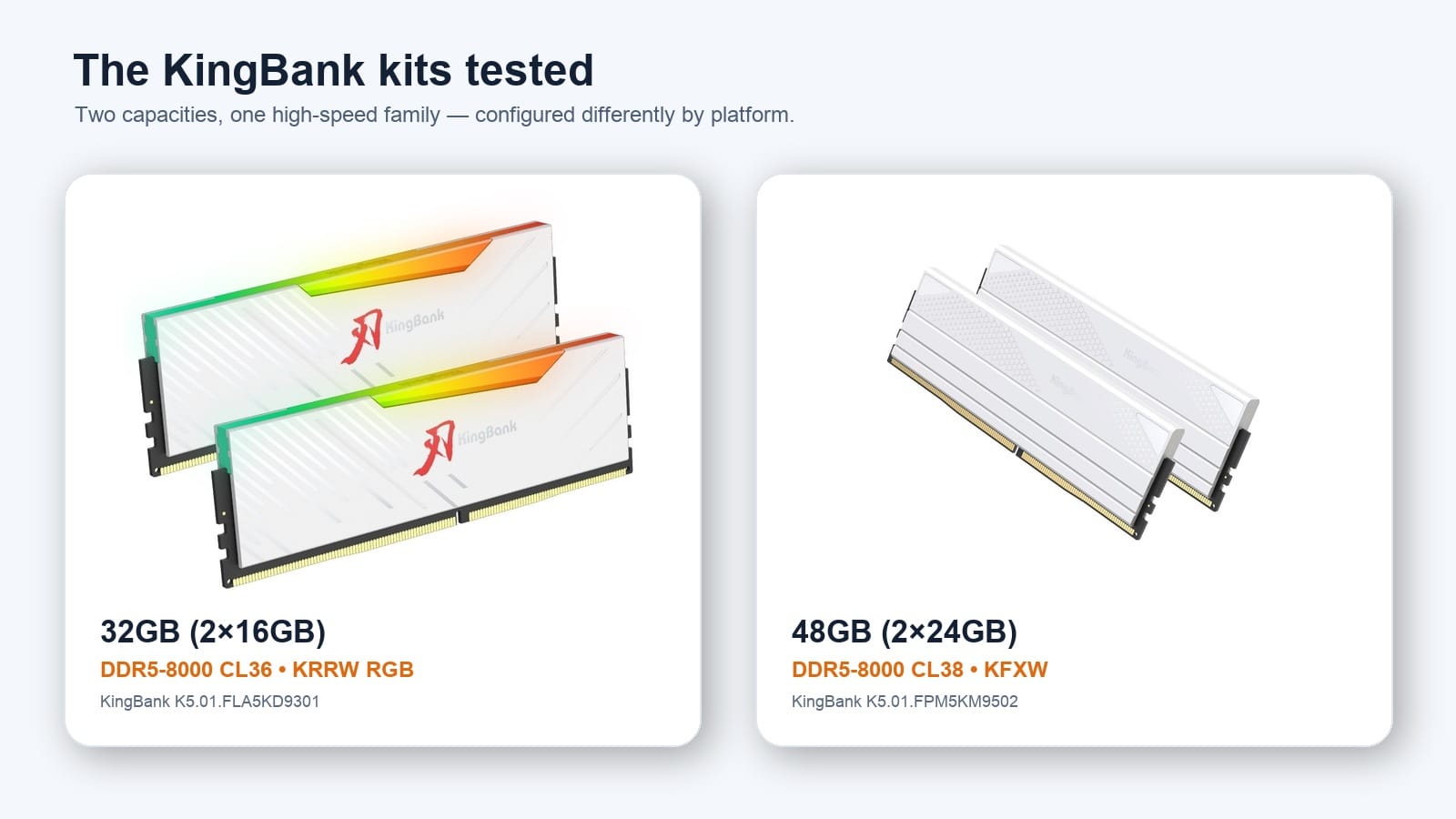
- KingBank KRRW RGB 32GB (2×16GB), DDR5-8000 CL36 — SK Hynix memory with both EXPO-8000 and XMP-8000 entries.
- KingBank KFXW 48GB (2×24GB), DDR5-8000 CL38 — SK Hynix memory with EXPO-8000 and XMP-8000 entries.
An earlier KingBank KRRW 48GB sample was also tested at DDR5-6000 CL28 and DDR5-8000 CL38 on AMD. For the cross-brand comparison, our technical team used a XPG Lancer Blade RGB 32GB DDR5-5600 CL46 kit of memory.
The controlled AMD comparison used a Ryzen 9 9900X, Gigabyte X870 Gaming X WIFI7 with the latest BIOS, and an NVIDIA GeForce RTX 5090 with driver version 610.88. Testing was conducted using Windows 11 25H2.
The Intel comparison used a Core Ultra 7 270K Plus and Gigabyte Z890 AORUS ELITE WIFI7 ICE with the latest BIOS, and the same RTX 5090 GPU with the same driver version. Testing was also conducted on a fresh Windows 11 25H2 install.
AMD Findings: DDR5-6000 CL28 won the gaming tests
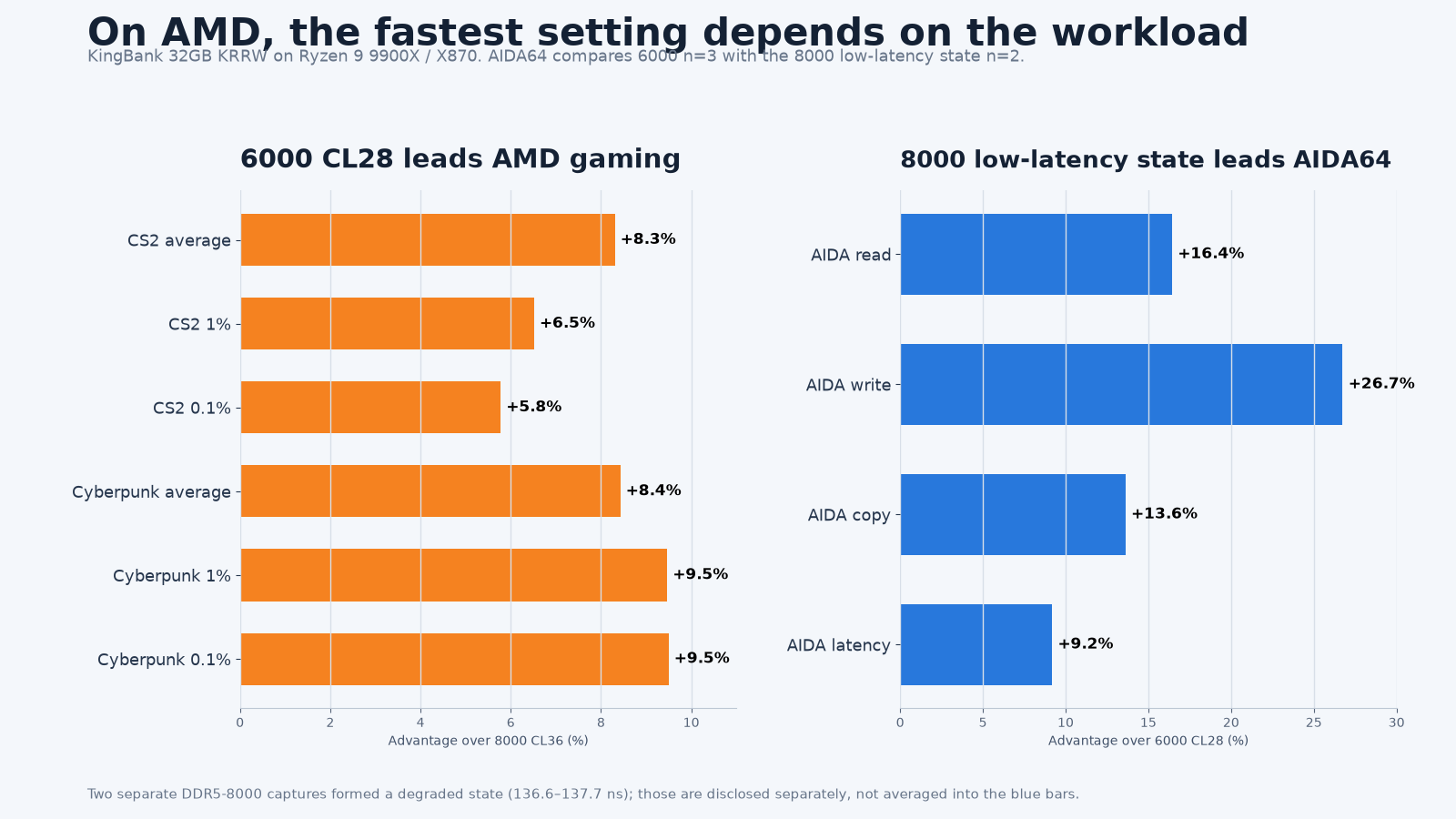
With the 32GB KingBank KRRW kit on the Ryzen 9 9900X system, a custom configured DDR5-6000 CL28 profile was faster than the stock EXPO1 DDR5-8000 CL36 profile in every game tested.
| Game | Metric | 6000 CL28 (n=4) | 8000 CL36 (n=3) | 6000 advantage |
|---|---|---|---|---|
| Counter-Strike 2 | Average FPS | 849.7 | 784.5 | 8.3% |
| Counter-Strike 2 | 1% FPS | 244.9 | 229.9 | 6.5% |
| Counter-Strike 2 | 0.1% FPS | 215.9 | 204.1 | 5.8% |
| Cyberpunk 2077 | Average FPS | 212.3 | 195.8 | 8.4% |
| Cyberpunk 2077 | 1% FPS | 120.2 | 109.8 | 9.5% |
| Cyberpunk 2077 | 0.1% FPS | 101.0 | 92.3 | 9.5% |
Our testing reveals that the DDR5-6000 CL28 custom profile was faster than the DDR5-8000 CL36 preset when looking at average, 1% and 0.1% lows for Counter-Strike 2 and Cyberpunk 2077. The margins are not small either - the average performance gain was 8%. In CPU-bound scenarios like renfering taxing physics effects or running at lower resolutions for the highest framerates, the lower latency of the DDR5-6000 kit mattered more than raw bandwidth.
The 6000 CL28 result was also remarkably stable between runs. The variation between runs remained below 0.7% in all four KingBank gaming groups. One Cyberpunk 2077 run with the DDR5-6000 kit contained a single long frame, and this result was retained in the data.
AMD Findings: DDR5-8000 produced higher AIDA64 bandwidth in its low-latency state
The gaming result does not make DDR5-8000 pointless. In the two observed low-latency captures, DDR5-8000 CL36 produced 13.6% to 26.7% higher AIDA64 throughput than the three DDR5-6000 captures:
| AIDA64 metric | 6000 CL28 mean (n=3) | 8000 CL36 low-latency mean (n=2) | 8000 advantage |
|---|---|---|---|
| Read | 80,127 MB/s | 93,290 MB/s | 16.4% |
| Write | 79,514 MB/s | 100,775 MB/s | 26.7% |
| Copy | 74,340 MB/s | 84,455 MB/s | 13.6% |
| Latency | 77.3 ns | 70.2 ns | 9.2% lower |
There is an important qualification. The table above uses only the two low-latency DDR5-8000 observations, which averaged 70.2 ns. Two separate DDR5-8000 captures recorded 136.6 to 137.7 ns and formed a degraded state averaging 137.1 ns. We have kept the states separate rather than combining them into a misleading four-capture mean. The screenshots prove that both states occurred, but they do not prove exactly which BIOS action caused the change.
That is why our AMD advice is practical rather than theoretical: verify the trained result after enabling a high-speed profile. A successful POST does not guarantee that the board applied the same controller ratio, secondary timings or latency state seen in the best run.
The 48GB KingBank sample in a separate test system with a Ryzen 7 9800X3D showed the same broad AMD preference in AIDA64; when running at DDR5-6000 CL28 speeds, it delivered 4.9% to 9.3% better memory results than the stock DDR5-8000 CL38 preset on the 9800X3D. That gives us results from two KingBank samples pointing in the same direction, a promising sign for buyers interested in our custom DDR5-6000 CL28 kit that we'll be selling later this year.
Full AIDA64 screenshots
Each image below is an uncropped original screenshot. Click or tap an image to open its full-resolution PNG in a new tab, where you can zoom in using your browser.
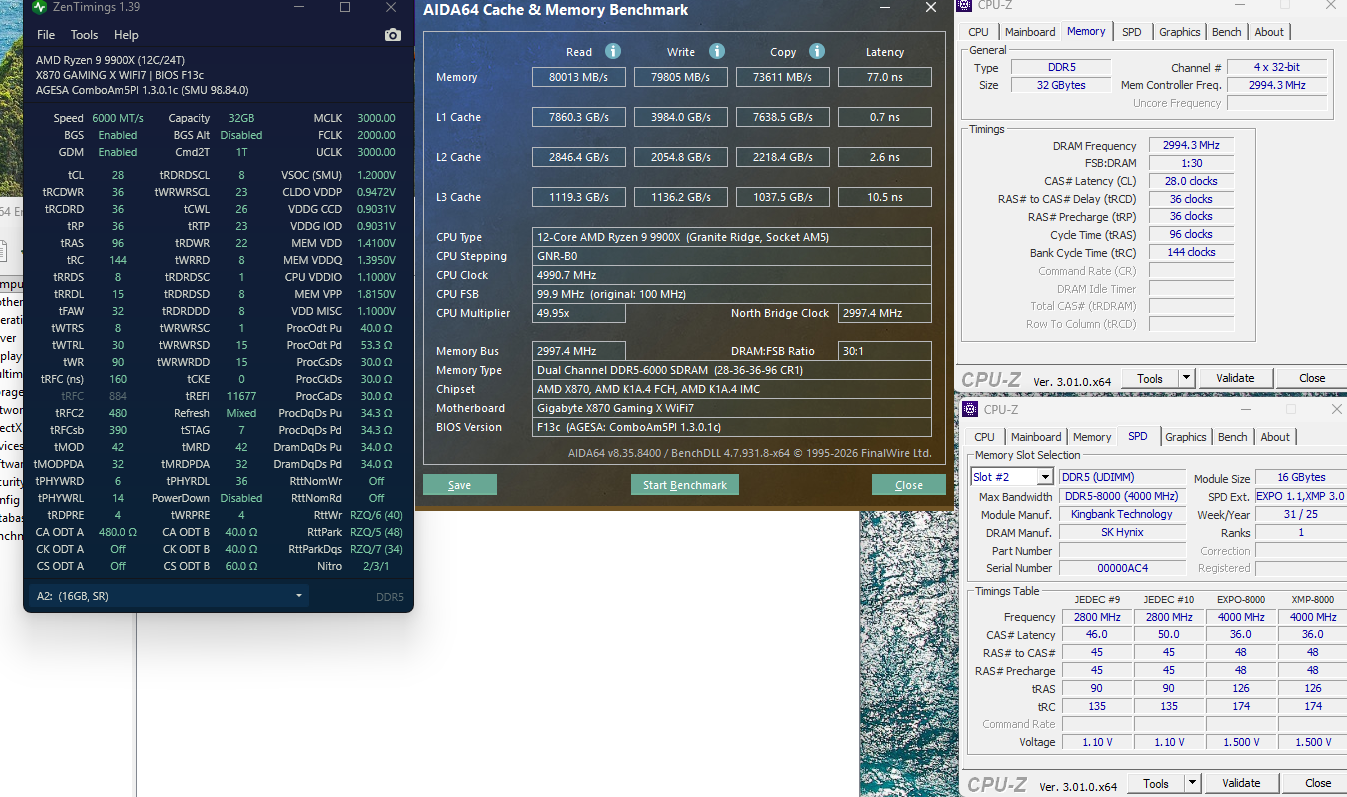
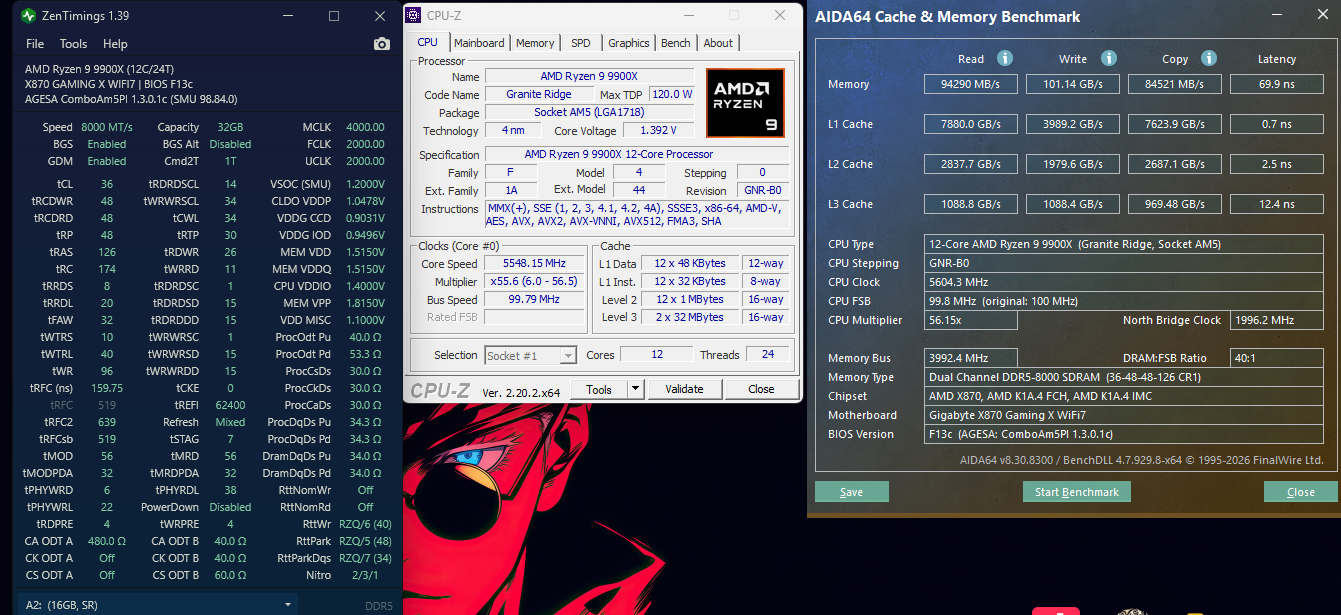
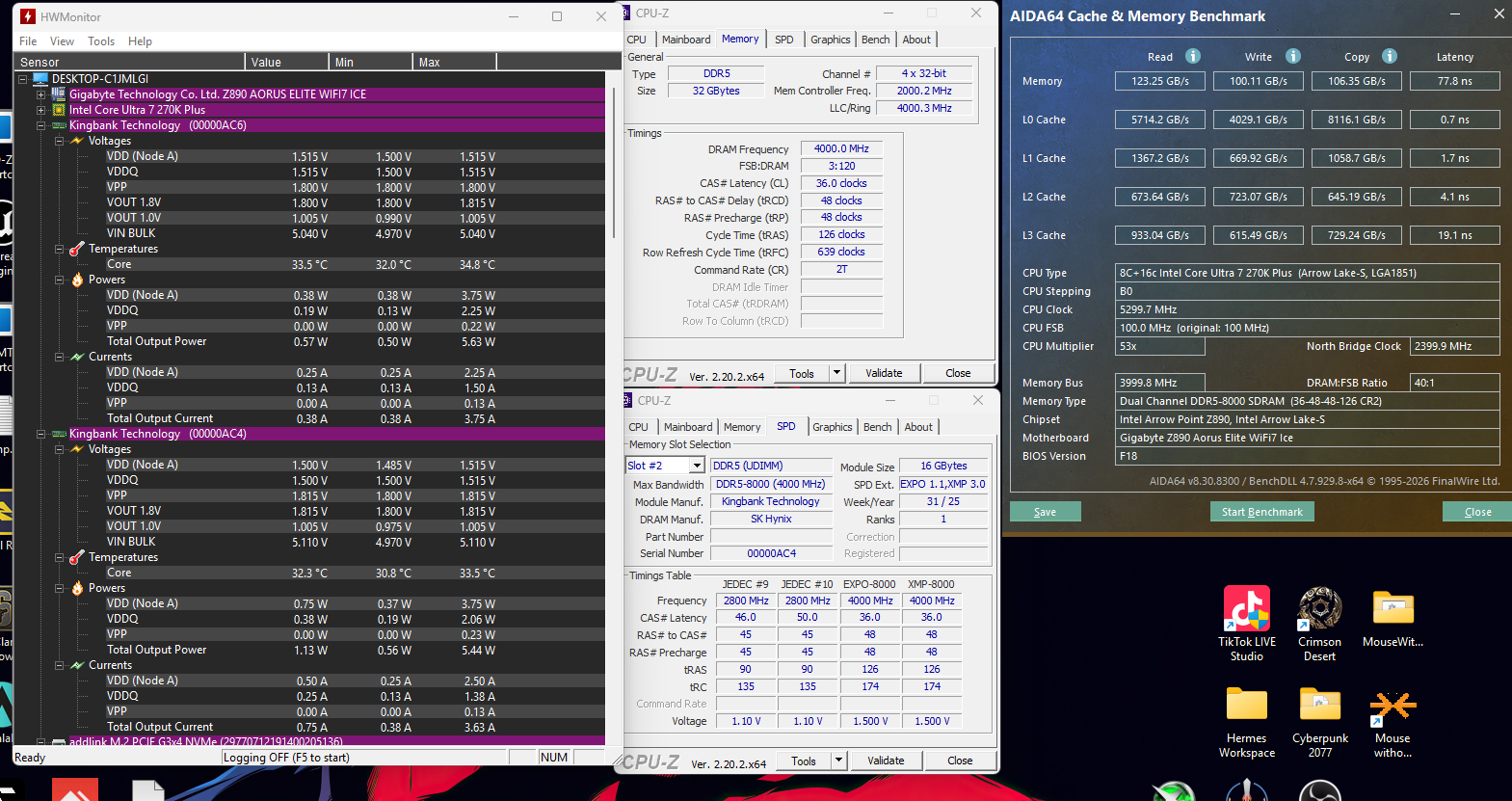
These are representative captures. The DDR5-6000 AIDA64 figures use all three supplied captures; the DDR5-8000 figures shown above use the explicitly selected low-latency state (n=2). Two separate degraded-latency captures are disclosed in the text rather than mixed into that state.
KingBank versus XPG on the same AMD bench
The XPG Lancer Blade RGB 32GB DDR5-5600 CL46 kit was the same-capacity reference. Its test set used the same Ryzen 9 9900X, X870 motherboard, RTX 5090 and GPU driver as the KingBank 32GB run.
Against that XPG kit, KingBank at DDR5-6000 CL28 was close in CS2 average FPS but opened a larger lead in the low-percentile results and in Cyberpunk. The KingBank means use four captures per game; the XPG means use three CS2 and five Cyberpunk captures:
| Game | Metric | KingBank 6000 CL28 | XPG 5600 CL46 | KingBank advantage |
|---|---|---|---|---|
| Counter-Strike 2 | Average FPS | 849.7 | 845.0 | 0.6% |
| Counter-Strike 2 | 1% FPS | 244.9 | 234.3 | 4.5% |
| Counter-Strike 2 | 0.1% FPS | 215.9 | 204.6 | 5.5% |
| Cyberpunk 2077 | Average FPS | 212.3 | 202.8 | 4.7% |
| Cyberpunk 2077 | 1% FPS | 120.2 | 110.3 | 9.0% |
| Cyberpunk 2077 | 0.1% FPS | 101.0 | 92.1 | 9.7% |
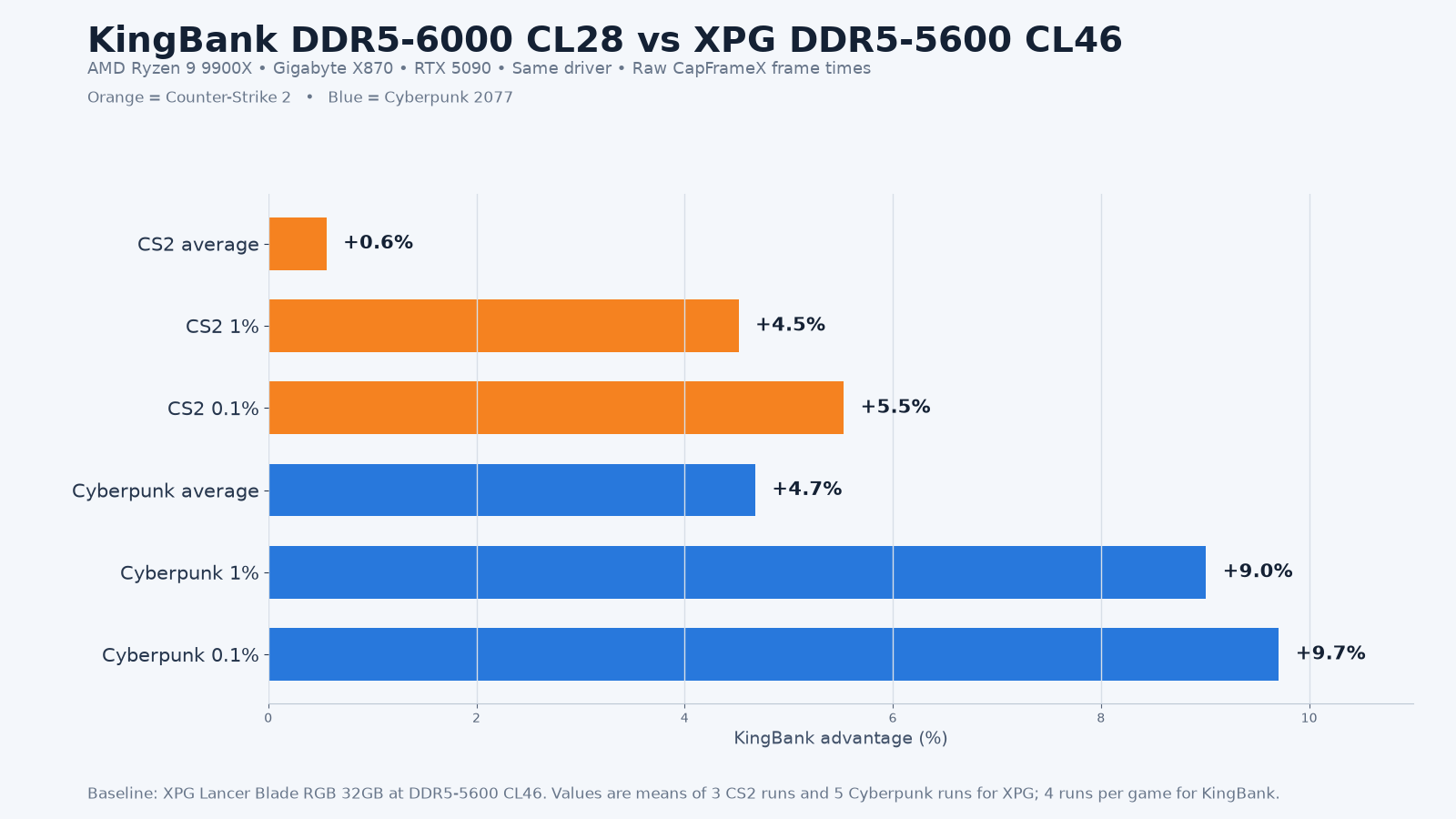
The synthetic tests mostly favoured KingBank, although XPG was slightly ahead in AIDA64 write. KingBank was 5.4% faster in AIDA64 read, 10.4% faster in copy, 13.3% lower in latency and 9.3% faster in 7-Zip. The XPG 7-Zip mean uses all four completed screenshots because no warm-up or exclusion was marked. This is a performance comparison on the recorded bench, not a price-to-performance claim.
Intel: use the rated DDR5-8000 XMP profile
The result flips on Intel. With the 48GB KingBank KFXW kit on the Core Ultra 7 270K Plus and Z890 bench, XMP1 DDR5-8000 CL38 beat a matched manual DDR5-6000 CL28 setting across AIDA64, 7-Zip and both games.
| Test | XMP1 DDR5-8000 advantage over 6000 CL28 |
|---|---|
| AIDA64 read | 28.2% |
| AIDA64 write | 23.4% |
| AIDA64 copy | 22.7% |
| AIDA64 latency | 9.3% lower |
| 7-Zip total rating | 10.4% |
| CS2 average / 1% / 0.1% FPS | 2.3% / 3.8% / 3.3% |
| Cyberpunk average / 1% / 0.1% FPS | 6.4% / 7.9% / 10.9% |
The 32GB KingBank CL36 kit backed up the absolute Intel performance result. At XMP1 DDR5-8000 it averaged 123.4 GB/s read, 101.3 GB/s write, 107.9 GB/s copy and 176.825 GIPS in 7-Zip, with low run-to-run variation. Five unique captures per game were retained for this kit even though the checklist described three; the evidence did not identify a warm-up capture to exclude.
On the tested Core Ultra 7 270K Plus and Z890 combination, XMP1 was the clear starting point for an 8000-rated KingBank kit. Other CPUs, BIOS versions and motherboards can train memory differently, so verify the applied timings and run a stability check before relying on the profile.
Which KingBank kit should you choose?
Choose 2×16GB or 2×24GB according to the capacity your applications need; this evidence does not show that capacity alone determines speed. Whichever kit you choose, check the motherboard QVL and BIOS, then confirm that the rated profile trains and passes stability testing on your specific CPU.
- For a high-end Intel build: KingBank KRRW RGB 32GB DDR5-8000 CL36 is the lower-capacity, tighter-timing option tested here.
- For more capacity on the tested Intel platform: KingBank KFXW 48GB DDR5-8000 CL38 gives you 2×24GB while retaining an 8000-rated profile. Its cleanest matched result here is on Intel; do not infer the same repeatability on every AMD system from that result.
- For an AMD gaming build where you want a ready-to-use 6000 CL28 profile: choose the forthcoming Wootware AMD-specific listing for this same KingBank module. Wootware will flash the module with an AMD EXPO profile at DDR5-6000 CL28, and the product will be backed by the full warranty. We will add the product link when the dedicated listing is ready.
As checked on 26 August 2026, both currently linked product pages displayed In stock with Wootware. Stock and pricing can change.
What this comparison does not cover
- These results do not validate DDR5-8000 on every AM5 or Z890 system. CPU memory-controller quality, motherboard layout and BIOS training still matter.
Bottom line
For the tested Core Ultra 7 270K Plus/Z890 platform, an 8000-rated KingBank kit using XMP was the fastest configuration. For AMD gaming buyers who do not want to tune manually, Wootware will offer this same KingBank module through a dedicated AMD-specific listing, flashed by Wootware with an AMD EXPO profile at DDR5-6000 CL28 and backed by the full warranty. An 8000-rated KingBank kit can produce higher synthetic AIDA64 bandwidth on the tested AMD bench, but only after the trained state is verified.
Against the matched XPG reference, KingBank at 6000 CL28 was effectively level in CS2 average FPS, stronger in the low-percentile results, and clearly ahead in Cyberpunk and 7-Zip. The practical advantage is not one headline speed; it is having a KingBank option that can be matched to the platform and workload.
Test methodology and limitations
Testing was conducted by our technical team on Wootware’s AMD X870 and Intel Z890 benches between 28 July and 25 August 2026. CapFrameX average and percentile FPS were recalculated from positive frame-time values in the raw JSON captures. Percentage differences use the unrounded group means, while the displayed FPS means are rounded to one decimal; recalculating from the printed values can therefore differ by 0.1 percentage point. The KingBank AMD setting comparison uses four DDR5-6000 and three DDR5-8000 captures per game. The XPG comparison uses three CS2 and five Cyberpunk captures; the 32GB Intel absolute result uses five captures per game, while the 48GB Intel profile comparison uses three captures per game and setting.